Your close is late, your dashboards don't agree, and every entity seems to have its own version of the truth. That's the moment the Sage Intacct API stops being a technical detail and becomes a finance problem, because the issue isn't whether data can move, it's whether finance can trust what moves, when it moves, and how fast it lands in the books.
For CFOs and Controllers, the prize is simple, faster close, cleaner audit trails, real-time visibility, and less spreadsheet triage. For CEOs, it's control without adding more headcount. And for finance teams outgrowing QuickBooks, it's the difference between a system that supports growth and a system that blocks it.
Key Takeaways
- The Sage Intacct API only earns its keep when it does three things well: move data into Intacct cleanly, support the reports leadership reads, and keep the audit trail intact.
- Sage’s own documentation flags recurring production failure modes — unauthorized sender IDs, SSL certificate rotation breaking hardcoded certificate files, dates without timezone context, ISO 8601 incompatibility, and picklist differences between custom and standard objects.
- Timezone handling is one of the most common places finance teams get burned — a date without timezone context can post a transaction to the wrong period, which matters most in healthcare, nonprofit, dental, and professional-services close cycles.
- A fast planning checklist for any integration project: choose REST for new work, confirm Web Services credentials and session handling for XML, define dimensions before build starts, test sender authorization and certificate rotation, and assign ownership before go-live.
- Production integrations should be monitored like financial controls, not treated as one-time IT projects — someone needs to own an integration’s health every month if it touches revenue, payables, or the close.
- Lucentive is a Sage Intacct National Premier Partner with mid-market, healthcare, and nonprofit implementation experience, and offers a 30-minute working session to pressure-test entity structure, reporting needs, and integration risk.
Table of Contents
- Why Finance Leaders Care About the Sage Intacct API
- REST API vs XML API and Which One to Choose
- Authentication Methods and Session Management
- Core Endpoints for Financial Operations
- Dimensions and Custom Objects for Reporting
- Operational Reliability and Production Failures
- API Usage Monitoring and Governance
- Quick Reference for Integration Planning
- Why the Right Implementation Partner Matters
Why Finance Leaders Care About the Sage Intacct API
A controller closes the month, but the numbers for two entities still sit in separate systems. One team exports files from billing, another pastes them into spreadsheets, and someone on finance spends the afternoon chasing a mismatch that should never have reached the close in the first place. That's where the Sage Intacct API matters, because it turns disconnected workflows into a managed financial flow instead of a manual rescue mission.
The API is only useful to a finance leader if it does three things well. It has to move data into Intacct cleanly, support the reports leadership reads, and keep the audit trail intact when auditors or department heads ask where a number came from. That's why I treat the API as part of the finance operating model, not as developer plumbing.
For teams comparing software options, the bigger question isn't whether Intacct has endpoints. It's whether those endpoints support the way your business runs across entities, departments, grants, locations, or sites. Lucentive's Sage Intacct overview is a useful starting point for that business-first conversation, especially if you're mapping ERP change to process change rather than just checking feature boxes, Lucentive's Sage Intacct overview.
Practical rule: if your finance team still depends on exports and rekeying after go-live, the implementation wasn't finished. The API should remove work from the close, not create a new kind of close work.
The clearest signal that an ERP is ready for a growing finance organization is this. Your systems should feed Intacct, Intacct should feed your reporting layer, and the result should be usable without cleanup. If that chain breaks, you don't have visibility, you have a prettier version of the same manual mess.
REST API vs XML API and Which One to Choose
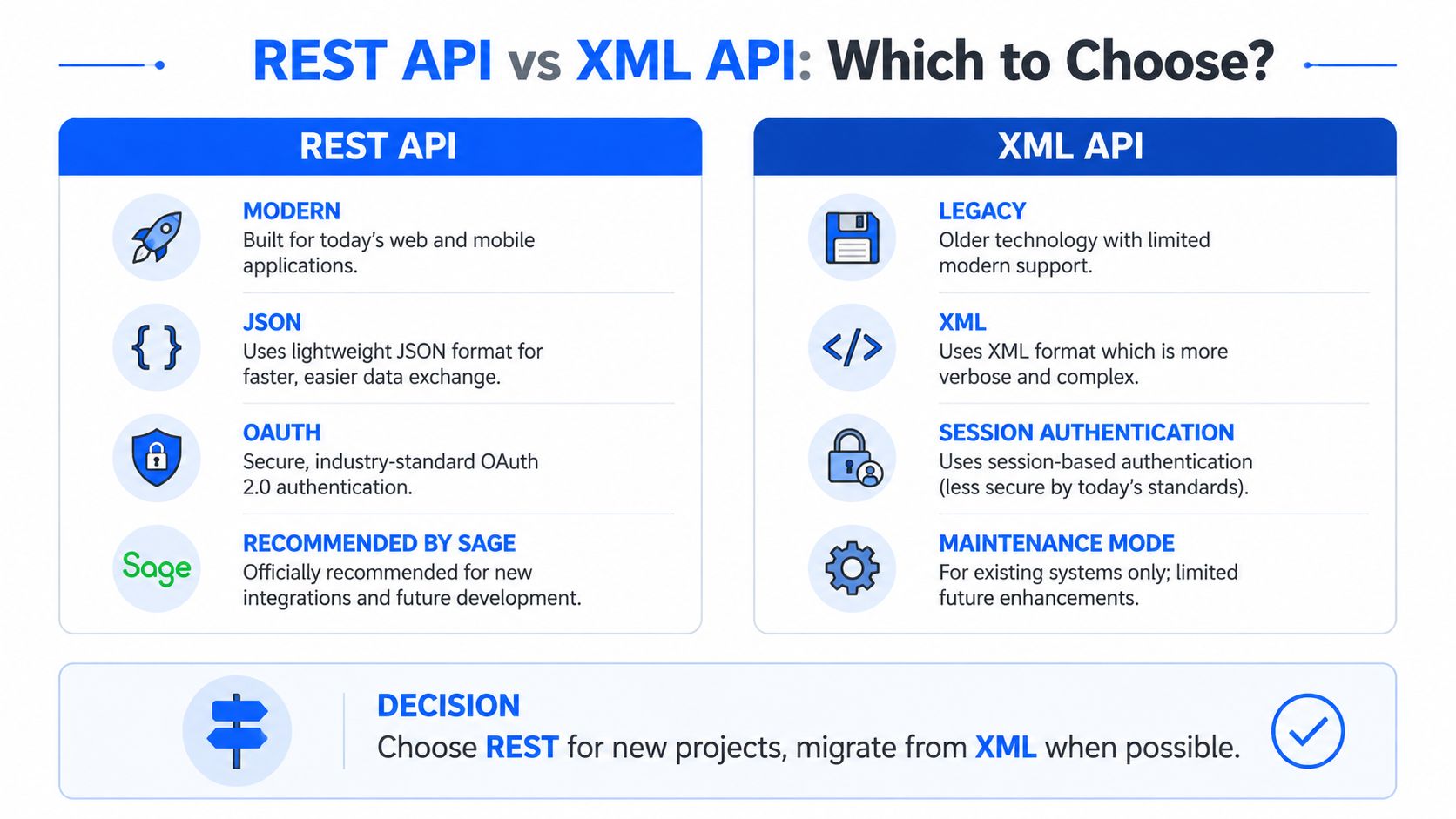
Sage Intacct gives finance teams two official integration surfaces, REST API and XML API. For new work, REST is the right default. Sage says new objects and features are released through REST, while XML stays in place for backward compatibility, Sage Intacct usage insights and API guidance.
How to choose
| Criteria | REST API | XML API |
|---|---|---|
| Strategic fit | Recommended for new integrations | Use for existing integrations |
| Feature coverage | New objects and features appear here first | Supported for backward compatibility |
| Integration style | Better default for modern client apps | Legacy integration model |
| Long-term planning | Stronger choice for future builds | Keep only where migration isn't practical |
| Operational direction | Modern default | Maintenance path |
REST reached General Availability in Release 1 of 2025, published in February 2025, so teams planning a fresh build or migration have a clear production-ready path, Sage Intacct usage insights and API guidance. That matters because the safer choice is the one Sage is actively extending, not the one that merely continues to work.
XML still matters for live systems that depend on it. Keep it if the integration is stable and the business case for a rewrite is weak. If you are starting from zero, use REST. If you are carrying an older interface into production, treat XML as a holdover and put migration on the roadmap before the next close cycle exposes the gaps. The operational risk is not the protocol itself. It is letting an aging integration sit in the middle of finance workflows with no clear owner, no monitoring discipline, and no exit plan.
| Criteria | REST API | XML API |
|---|---|---|
| Best for | New client applications | Existing integrations |
| Future coverage | New objects and features | Backward compatibility |
| Recommendation | Use it first | Keep it where needed |
| Long-term value | Cleaner path forward | Legacy support only |
Authentication Methods and Session Management
The XML Web Services API uses a single HTTP POST endpoint at requires an active Web Services developer license plus an authorized sender ID and password, and supports a preferred session-based flow viagetAPISession' for repeated calls, Sage Intacct web services documentation.
That's the part many teams underestimate. Authentication isn't just “can we log in.” It's “can our integration keep working every day without someone babysitting it after hours?” For recurring traffic, a session-based flow is the sane choice because it reduces friction on repeated calls and gives the implementation a more stable operating pattern.
What usually goes wrong
A lot of failed integrations aren't failures of the API itself. They're authorization failures, sender ID issues, or weak session handling that turns a working test connection into a fragile production workflow. If your team is building or reviewing the implementation, ask whether the connection logic is designed for ongoing traffic or just for a demo.
A secure integration is one the finance team doesn't have to think about until something genuinely changes.
Lucentive's security-focused Intacct material is worth reviewing when you're evaluating partner fit, especially if your leadership team cares about access control, operational discipline, and the security model behind the finance stack, Lucentive's Sage Intacct security overview.
What to insist on
- Authorized sender setup: Confirm the sender ID and password are handled correctly before go-live.
- Session reuse: Use the preferred session-based pattern for repeated XML calls instead of rebuilding authentication every time.
- Access discipline: Separate test and production credentials so one environment doesn't contaminate the other.
- Retry logic: Design for real production traffic, not just a happy-path demo.
The bottom line is simple. Authentication should be boring. If your team is still “figuring out login” after deployment, the implementation is not ready for finance operations.
Core Endpoints for Financial Operations
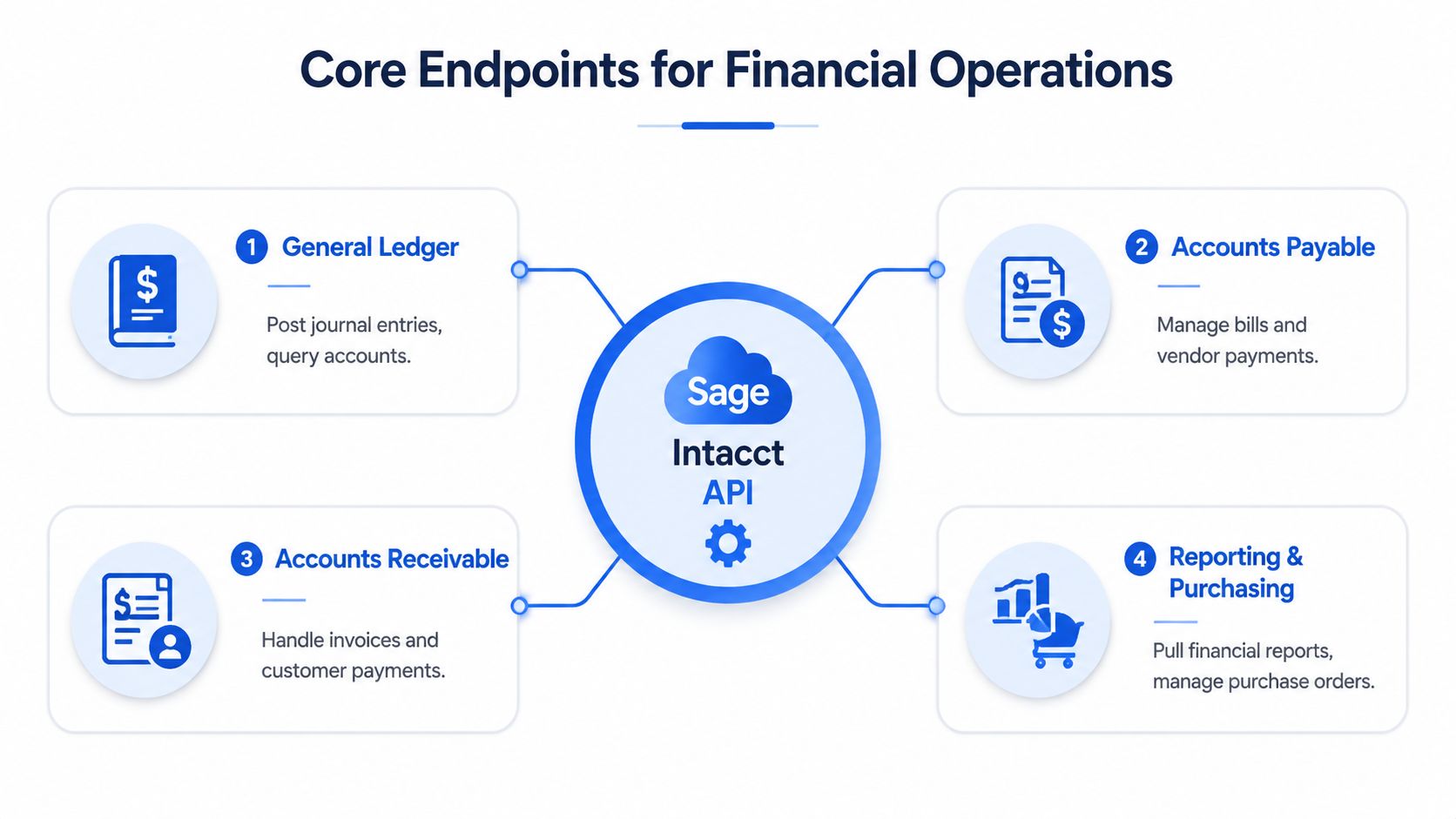
Finance teams do not need a catalog of endpoint names. They need the handful of connections that stop manual rekeying and keep controls intact after go-live. In practice, that usually means posting, invoicing, vendor activity, and reporting.
General ledger automation is the first place to look. If journal entries arrive late or in the wrong structure, the close slows down and finance starts cleaning up integration mistakes instead of reviewing results. Accounts payable and accounts receivable are the next pressure points, because bills, payments, invoices, and cash updates create the most repetitive handoffs. Reporting and purchasing matter for the same reason, they feed management views that should not depend on exports and spreadsheet merges.
Sage Intacct's enterprise context also fits governed finance operations, where audit trails and defined time periods are part of the operating model, Sage Intacct history and enterprise context. That is the right bar for teams that need traceability, not just data movement.
Use the API where the process breaks most often, not where it looks interesting in a demo.
- General Ledger: automate posting flows and cut late-entry cleanup.
- Accounts Payable: move bills and payment data without rekeying.
- Accounts Receivable: sync invoice and payment events so cash status stays current.
- Reporting and Purchasing: feed finance reporting without waiting on file exports.
The test is whether the workflow survives month-end, approvals, and exception handling. If a process touches the close, the audit trail, or a board report, it belongs on the integration shortlist. Lucentive's core financials approach for Sage Intacct lines up with that view, because the handoff design matters more than the connection itself.
The integrations that hold up in production are the ones finance can trust without babysitting.
Dimensions and Custom Objects for Reporting
Sage Intacct dimensions organize company data for reporting, sorting, and transaction tagging. Standard dimensions like Location and Department are available by default, and teams can create user-defined dimensions for custom reporting needs, Sage Intacct dimensions documentation.
That is a control layer, not a cosmetic feature. If dimensions are designed poorly, reports turn into disputes. If they are designed well, the API can tag data at the source and finance avoids cleanup later.
Why this matters in practice
Dimensions appear on reports and transaction entry pages, so they shape how people enter data, how leaders review results, and how auditors follow the trail. Where a relationship is to-one, values can auto-fill, which cuts manual tagging errors and keeps transactions consistent.
The setup has to happen before integration work starts. If a partner connects source systems to Intacct without a dimension strategy, the integration may work technically and still fail finance's reporting rules.
Practical implications
- Start with standard dimensions. Use built-in structures like Location and Department with intent.
- Add user-defined dimensions only when needed. Every extra field should support a real reporting need.
- Match reporting structure to business structure. Transaction entry should reflect how leadership reads the business.
- Use auto-fill where it reduces errors. Let relationships handle repetitive tagging and leave less room for manual mistakes.
Lucentive's dimensions guidance for Sage Intacct is useful if you want operational data to land in board-ready reports without building another reconciliation layer.
Strong dimensional design keeps finance from explaining numbers that should already make sense.
Operational Reliability and Production Failures
The hardest integrations to fix are the ones that worked in testing and start drifting later. Sage's FAQ is blunt about the failure modes, unauthorized sender IDs, SSL certificate rotation breaking hardcoded certificate-authority files, dates without timezone context, ISO 8601 incompatibility, and picklist handling differences between custom and standard objects, Sage Intacct FAQ.
What actually breaks
These are not syntax problems. They're contract problems between systems, infrastructure problems, and data-format problems that show up only after real users, real dates, and real security changes enter the picture. That's why a test pass can still lead to a production miss.
Time handling is one of the most common places finance teams get burned. If dates don't carry timezone context, a cutoff can land in the wrong period, and in healthcare, nonprofit, dental, or professional-services environments, that's not a small issue. It can change the story told by the books.
Build for failure before go-live
Production integrations should be monitored like financial controls, not treated like one-time IT projects.
The operational answer is release-aware monitoring, credential hygiene, and a clear ownership model for data contracts. Your implementation partner should be checking what happens when certificates rotate, when a source system changes a picklist, and when a date format shifts under the hood.
The problems to put on your checklist
- Sender authorization: verify that the integration identity is approved and stays approved.
- Certificate handling: avoid brittle hardcoded certificate paths.
- Date rules: confirm how dates behave across time zones and reporting cutoffs.
- Object differences: test custom and standard objects separately because they don't always behave the same way.
Many software-only projects fall apart. The license is fine, the endpoint is fine, but the integration still fails because nobody owned the messy edge cases that finance feels every day.
API Usage Monitoring and Governance
Sage Intacct exposes API usage monitoring, including completed and failed transactions, and keeps metrics available for the current month plus the previous three months. That gives finance teams a control point, not just a technical log.
Use it. If your team only checks integrations during implementation, you miss the problems that surface later. Drift, failed transactions, and slow degradation usually show up in reporting before IT gets a ticket.
Why governance matters after go-live
Release notes matter because Sage keeps changing finance objects and API behavior. Integrations need ongoing review, because a clean signoff at go-live does not protect you from a later object update or changed field behavior. If no one is watching usage and failure patterns, the first alert often comes from a bad report.
The implementation partner has to turn that usage data into action. Lucentive should be advising on what failed, what changed, and what needs retesting, not just helping with setup. Question is simple, what will your team do when the logs show trouble?
Operating rule: if an integration touches revenue, payables, or the close, someone owns its health every month.
What to review regularly
Start with failed transactions. Look for repeat patterns and recurring endpoints, not one-off noise.
Then check completed volume to confirm the integration is still doing the work you expect. Tie changes back to release notes and object updates so you can separate product behavior from a real integration break.
Ownership matters just as much. Assign a business owner, not only an IT owner, so someone is accountable when usage shifts or failures climb.
A finance leader should require this discipline. Without it, the risk does not disappear, it moves from visible spreadsheet chaos to invisible system chaos.
Quick Reference for Integration Planning
A migration plan fails fast when teams treat the Sage Intacct API as a coding task instead of a finance control problem. Choose REST for new client work, keep XML only for legacy support, and lock down authentication, dimensions, and monitoring before anyone cuts over. Use this Lucentive ERP implementation planning guide to pressure-test the timeline, ownership, and resourcing before the project starts.
Fast planning checklist
- API choice: REST for new integrations, XML for backward compatibility.
- Authentication: confirm Web Services credentials and session handling where XML is involved.
- Reporting model: define dimensions before build starts.
- Risk review: test sender authorization, certificate rotation, date handling, and object differences.
- Monitoring: review completed and failed transactions on a regular cadence.
- Ownership: assign finance and implementation partner accountability together.
The right plan keeps the integration useful after go-live. Ask one question in every planning session: will this reduce close work, improve audit readiness, or cut manual handoffs? If the answer is no, the integration is creating work, not removing it.
Why the Right Implementation Partner Matters
A lot of teams can wire up an API. Far fewer can keep it reliable when the world starts changing the inputs, the certificates, the dates, and the reporting logic. That's why the partner matters as much as the software, because the software alone won't resolve the governance gaps that show up after go-live.
Lucentive is a Sage Intacct National Premier Partner with deep mid-market, healthcare, and nonprofit experience, and that matters if your finance team needs an implementation that accounts for operational reliability, not just feature setup. The point is to build an ERP environment your CFO can trust, not one that needs constant explanation.
When I see teams struggle, the pattern is usually the same. They bought the platform, but they didn't buy enough help designing the handoffs, the dimensions, the authentication model, or the production monitoring. That's where a short working session pays off, because it surfaces fit issues before they turn into expensive cleanup.
Schedule a 30-minute working session with Lucentive if you want to evaluate whether Sage Intacct fits your entity structure, reporting needs, and integration risks. The right conversation upfront is cheaper than fixing a production workflow after month-end.
If you're comparing ERP options or trying to clean up an existing Intacct environment, Lucentive can help you pressure-test the integration design, reporting structure, and operational controls before you commit. Visit Lucentive to schedule a Sage Intacct demo or a short discovery call, and bring your current close pain, reporting gaps, and integration questions with you.
Summary
The Sage Intacct API turns disconnected billing, payroll, and reporting workflows into a managed financial flow, but only when it’s treated as a finance control problem rather than a coding task. REST API is the right default for new integrations, while XML API still has a place in stable legacy environments, and the real success factors sit around the API itself: authentication design, dimensional structure, monitoring, and clear ownership after go-live.
For CFOs, Controllers, and finance teams evaluating an integration or cleaning up an existing Intacct environment, the goal is the same regardless of which API a project uses — remove manual handoffs from the close, protect the audit trail, and make sure reporting holds up through month-end, approvals, and reviews without spreadsheet cleanup.
FAQ
What causes most Sage Intacct API integrations to fail in production?
Most failures aren’t problems with the API itself. They’re authorization failures, sender ID issues, or weak session handling that turns a working test connection into a fragile production workflow, plus data-format problems like timezone-less dates or ISO 8601 incompatibility that only surface once real users and real dates hit the system.
How does SSL certificate rotation affect Sage Intacct integrations?
If an integration relies on a hardcoded certificate-authority file, a routine certificate rotation on Sage’s side can break the connection without warning. Production integrations should be built to handle certificate changes gracefully, and a partner should be checking for this before it causes a failed transaction during a close.
What’s the difference between REST API and XML API authentication?
The XML Web Services API uses a single HTTP POST endpoint and requires an active developer license plus an authorized sender ID and password, with a preferred session-based flow for repeated calls. REST is Sage’s recommended default for new integrations and is where new objects and features are released first.
How often should finance teams review Sage Intacct API usage data?
On a regular, ongoing cadence rather than only at implementation. Sage keeps usage metrics available for the current month plus the previous three months, and drift, failed transactions, and slow degradation usually show up there before anyone opens an IT ticket.
What should finance teams verify before an integration goes live?
Confirm authorized sender setup, use session reuse for repeated XML calls, separate test and production credentials, and design retry logic for real traffic rather than a demo. Dimensions should also be defined before the build starts so reporting doesn’t need cleanup after go-live.