A controller can spend an entire week preparing a quarterly close and still lack a reliable answer to a basic question: which entity generated the margin, and can the reported balance be defended? The problem often starts with several QuickBooks files, inconsistent classes, manual eliminations, disconnected operational systems, and historical transactions that no longer fit the way the company operates.
At that point, QuickBooks data migration services aren't a file-export convenience. They're a finance control project. The objective is to move the accounting history into a modern cloud ERP while preserving the relationships, approvals, reporting logic, and audit evidence your team relies on. Done properly, a migration gives finance leaders cleaner closes, better visibility, and a more defensible foundation for growth. Done casually, it creates a new system with old problems hidden inside it.
Table of Contents
- The QuickBooks Wall Finance Leaders Hit Before Migration
- What QuickBooks Data Migration Services Actually Cover
- The Migration Checklist That Protects Your Books
- Realistic Timelines by Scope and Complexity
- What Quietly Breaks During a QuickBooks Migration
- How to Choose the Right Migration Partner
- Cost Considerations Most Budgets Underestimate
- Summary
- FAQs
The QuickBooks Wall Finance Leaders Hit Before Migration
The CFO's immediate problem usually isn't that QuickBooks has stopped opening. It's that the business has outgrown the way QuickBooks stores and reports information.
A company may have transactions distributed across three company files, with each file using classes differently. One entity tracks programs, another tracks locations, and a third relies on account names to carry information that should have been structured fields. The auditor asks for consolidated reporting, the board wants an acquisition view, and the Controller is forced to reconcile separate reports before anyone can trust the answer.
QuickBooks became a constraint because the finance model changed faster than the accounting structure. Historical market adoption helps explain why this is common. QuickBooks held about 74% of the U.S. small-business accounting market by 2005, and its share of retail units in the business accounting category reached 94.2% by March 2008, according to NPD Group, as summarized in this QuickBooks history timeline. A platform with that reach naturally became the system many organizations kept long after their reporting requirements became more advanced.
Practical rule: If finance needs spreadsheets to reconstruct entity, department, project, or fund performance after every close, the migration decision is already an operating decision.
The stakes become clearer during an audit, acquisition, or lender review. A flat export may contain the right total but lose the links between invoices, customers, payments, tax codes, bank deposits, and general ledger accounts. The number may appear correct at the top level while the supporting detail no longer explains how the balance was created.
For healthcare organizations, multi-site clinics, nonprofits, and professional services firms, this distinction matters. Project accounting, grant tracking, restricted funds, intercompany activity, and operational integrations depend on structure, not just totals. Finance leaders evaluating alternatives for healthcare providers outgrowing QuickBooks should treat migration as the route to clean reporting and stronger control, not merely as an upgrade from desktop software.
What QuickBooks Data Migration Services Actually Cover
QuickBooks data migration services combine people, processes, and tools to move accounting data into a target platform without abandoning the relationships that make the data useful. The scope can include the chart of accounts, customers, vendors, items, open receivables and payables, payroll summaries, transactions, historical detail, and integration-related information.
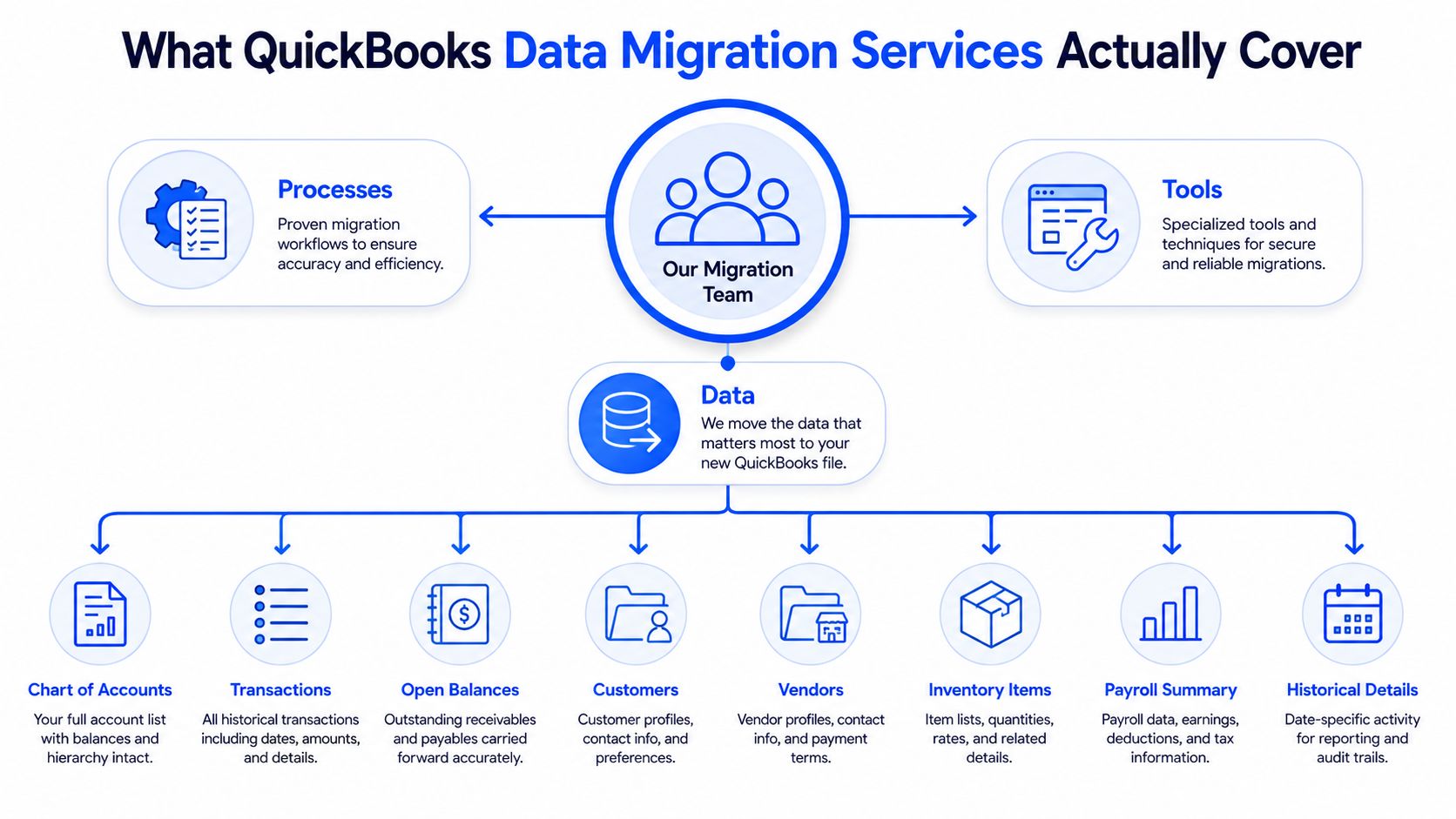
The work starts with discovery. A migration team inventories every QuickBooks file, legal entity, integration, reporting convention, payroll dependency, and historical period that matters. It then tests data quality against the target system's requirements. That distinction is important because a source file can be internally acceptable while still being unsuitable for a structured ERP.
The core workstreams
- Data audit: Identify duplicates, inactive records, orphaned transactions, unusual account behavior, and inconsistent dimensions.
- Chart-of-accounts mapping: Translate accounts, classes, locations, items, projects, and other QuickBooks conventions into the target model.
- Transaction and subledger conversion: Decide which detail will move, which balances will be summarized, and how open items will remain connected.
- Opening balance preparation: Build a controlled opening balance file that agrees with the approved source reports.
- Integration carryover: Reconnect banking, payroll, billing, CRM, expense, inventory, or operational systems where the target ERP requires a different interface.
- Reconciliation support: Compare trial balances, general ledger detail, aging, and management reports through the first parallel close.
The deliverables should be tangible. Require a mapping document, converted trial balance, opening balance file, exception log, and validation report with approval from both the migration team and finance leadership. If a provider only promises that records will be “loaded,” it hasn't defined accountability.
Migration also sits inside a broader ERP program. Process redesign, approval workflows, integration design, training, change management, and reporting development determine whether the new system improves finance operations. A Sage Intacct core financials implementation can provide the target structure, but software alone won't decide which historical relationships must be preserved or which legacy practices should be retired.
The Migration Checklist That Protects Your Books
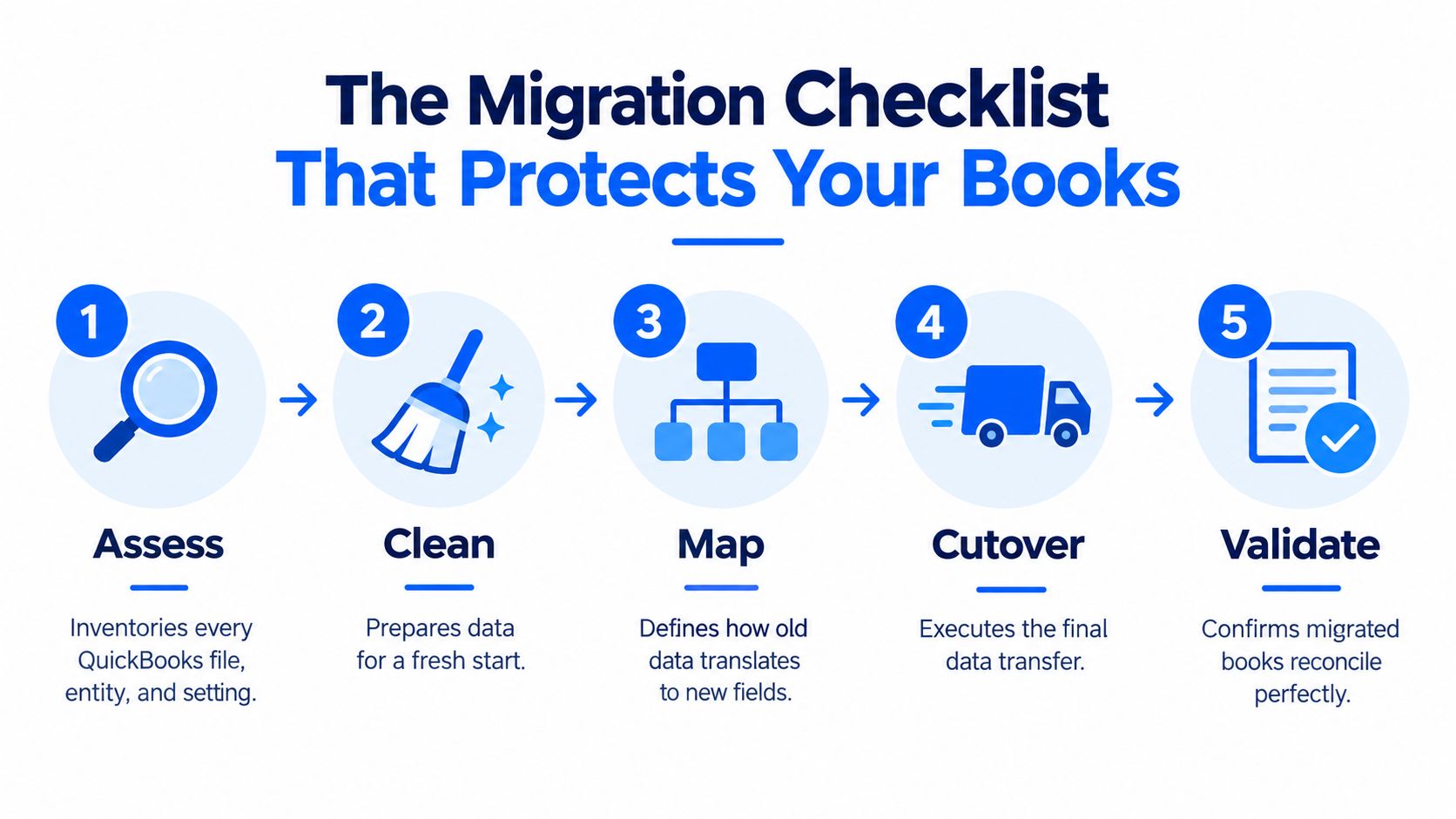
A reliable migration follows five phases: Assess, Clean, Map, Cutover, and Validate. Each phase has a different purpose, effort profile, proof point, and sign-off artifact. Skipping one usually shifts the work into the first close, where mistakes cost more and visibility is lower.
Assess
The team inventories files, entities, users, integrations, reporting packages, payroll dependencies, custom fields, and historical periods. The usual effort depends on the number of files and the condition of the books, but the validation question is consistent: can the team produce a complete source-system baseline?
The artifact should include an approved inventory, data-quality assessment, scope decision, and list of reports that will serve as the reconciliation baseline.
Clean
Cleanup removes duplicate customers and vendors, resolves orphaned transactions, closes or explains open items, and addresses account structures that the target system can't accept. QuickBooks Online list imports are capped at 1,000 rows or 2 MB per file, and Desktop capacity limits include 14,500 combined names, 10,000 Chart of Accounts entries in Pro and Premier, and 100,000 in Enterprise, according to Intuit's import and capacity guidance. Those limits make batching, deduplication, and controlled mapping practical requirements for larger datasets.
Validation means rerunning exception reports and confirming that every unresolved item has an owner and a documented disposition. The sign-off artifact is a cleanup log, not a verbal assurance.
Map
Mapping translates old account and dimension logic into the target structure. This is often the most judgment-intensive phase because finance must decide whether a legacy class becomes a department, location, project, fund, or a combination of dimensions.
The proof is a mapping workbook tested against representative transactions and required reports. Finance leaders should sign off on the future reporting model before the build proceeds.
Cutover
Cutover includes the freeze window, final extraction, transformation, load, opening balances, integration activation, and source-to-target reconciliation. Intuit's global transfer guidance shows that even migrations within the QuickBooks ecosystem are formal, tool-supported processes with defined timing. A cutover plan should therefore name owners, dependencies, approval gates, and rollback conditions.
Validate
Validation compares the source and target trial balances, general ledger detail, AR and AP aging, bank activity, operational reports, and management dashboards. Intuit warns that large QuickBooks Online migrations can take hours and that reports may not match perfectly because export behavior and supported versions create limitations, as explained in its Desktop to Online conversion guidance.
The final artifact is a signed validation report covering the first parallel close. A useful data quality assurance plan turns that report into an operational control rather than a one-time checklist.
Realistic Timelines by Scope and Complexity
Migration schedules are set by entities, integrations, and data quality, not by the name of the destination platform. A clean single-entity conversion is a different project from consolidating several QuickBooks instances, rebuilding intercompany logic, and preserving audit-grade history.
One industry guide places most mid-market programs in the 3 to 8 month range and says consolidating multiple QuickBooks instances from acquisitions is often planned across 12 to 18 months, as described in this QuickBooks to Sage Intacct migration guide. Use those bands for planning, not as promises.
Migration Timeline Bands by Scope Driver
| Scope Profile | Typical Duration | Primary Driver | Risk of Slippage |
|---|---|---|---|
| Single entity with clean books | Within the shorter end of the mid-market range | Limited history, few integrations, stable reporting | Unresolved cleanup or late mapping decisions |
| Multi-entity operating model | Within the broader 3 to 8 month range | Consolidation, intercompany activity, dimensions, and integrations | Data quality and approval delays |
| Acquisition consolidation or major rebuild | 12 to 18 months is a common planning range | Multiple QuickBooks instances and redesigned operating model | Scope changes, entity sequencing, and opening balance complexity |
The project milestones should be visible: assess, design, build, pilot, cutover, parallel reporting, and first close. A compressed schedule comes from early access to files, prompt decisions on the future chart of accounts, disciplined scope, and a prepared close calendar.
The schedule expands when teams discover that historical data needs rebuilding, integrations aren't documented, or the chart of accounts is being redesigned during conversion. Multi-entity projects also require explicit treatment of intercompany eliminations and foreign currency rules. Finance teams can also align migration planning with broader software implementation controls described by the Project Management Institute. ERP implementation cost, time, and resource planning should begin before a vendor proposal, because the schedule is inseparable from the people and decisions the project requires.
What Quietly Breaks During a QuickBooks Migration
The most expensive migration failures are rarely the obvious ones. Finance can see whether a file loaded. It's harder to see that the customer-to-invoice relationship has been flattened, a class hierarchy has lost its meaning, or a payment no longer applies to the receivable it was meant to close.
Assumption one, the copy is the hard part
The copy is usually the mechanical portion. The difficult work is rebuilding the relational structure connecting customers, invoices, line items, accounts, tax codes, payments, deposits, projects, and reporting dimensions. When those relationships are broken, the target system may show a total that looks reasonable while aging, cash-basis reporting, or project profitability no longer agrees.
Assumption two, everything transfers
It doesn't. Custom reports, templates, price levels, and some payroll details may require redesign or manual reconstruction. Payroll history, year-to-date balances, adjustment transactions, and employee-level details can require separate treatment, particularly when the target system uses different payroll or workforce structures.
A migration isn't successful because the destination contains records. It's successful when finance can explain the records and reproduce the reports that matter.
Assumption three, a rerun is a harmless fix
A rerun can overwrite previously moved records instead of selectively updating them. That makes the reconciliation window harder to control and can turn a source-data problem into a target-data problem. Intuit's migration documentation also makes clear that conversion paths have limitations, deadlines, and report differences, so a team should define rollback and correction procedures before loading production data.
The practical response is to run a pilot, preserve the source backup, document every transformation, and test the reports that executives and auditors use. Don't wait for the first close to discover that payroll history, payment applications, or project dimensions need a separate reconstruction plan.
How to Choose the Right Migration Partner
Software-led migration treats the project as an extraction and loading exercise. That model can appear fast because the connector does the visible work. It becomes fragile when a finance team must interpret class, location, item, project, fund, entity, and intercompany structures.
Partner-led implementation adds judgment, controls, and accountability around the tooling. A capable team doesn't just ask whether a record can move. It asks whether the record should move, what it means in the target model, and how finance will prove that the result is correct.
Software Alone vs Partner-Led Implementation
| Dimension | Software Alone | Partner-Led Implementation |
|---|---|---|
| Speed | Fast for straightforward record transfer | Planned around discovery, mapping, testing, and controlled cutover |
| Risk | Leaves interpretation and reconciliation with internal finance | Assigns responsibility for data decisions and validation |
| Data fidelity | Preserves what the connector supports | Addresses relationships, exceptions, and reporting logic |
| Accountability | Usually limited to tool operation | Includes named owners, sign-offs, parallel close, and stabilization |
Look for a named migration architect, not only a sales account manager. Ask how the team handles duplicate records, unsupported fields, opening balances, historical payroll, intercompany eliminations, report mismatches, and a failed load. Demand to see the validation methodology, the exception log format, and the plan for post-go-live stabilization.
Industry experience matters when the accounting model is specialized. A healthcare provider may need operational and EMR integration decisions. A nonprofit may need fund and grant reporting. A professional services firm may need project accounting. Lucentive is a Sage Intacct National Premier Partner with experience serving mid-market organizations, healthcare providers, nonprofits, and general business finance teams. Its role in a project can include advisory, implementation, migration, and go-live support rather than software licensing alone.
Ask these questions during the vendor demo:
- Which person owns the migration design from discovery through first close?
- Which source reports will you reconcile, and who signs the validation report?
- How do you preserve relationships between subledgers and the general ledger?
- What happens if the pilot reveals that our historical structure doesn't fit the target model?
- How do you prepare users for workflow changes and approval controls?
A partner that answers with artifacts and decision points has likely done this before. A partner that answers only with connector features is asking your finance team to learn on live books. Strong ERP change management is part of migration quality because users must adopt the new controls for the investment to produce value.
Cost Considerations Most Budgets Underestimate
The license quote is only one part of the financial decision. Migration cost follows the number of legal entities, open fiscal years, historical depth, integrations, reporting requirements, and cleanup effort. A finance leader who budgets only for subscriptions is budgeting for access to software, not for a controlled transition.
The requested cost bands are often used for preliminary planning, but they aren't verified data and shouldn't be presented as universal market prices. Use a fixed-fee assessment to replace assumptions with a documented scope, data profile, conversion strategy, and list of exclusions.
Typical Cost Drivers and Ranges for QuickBooks Data Migration
| Scope Driver | Effort Impact | Indicative Cost Band |
|---|---|---|
| One clean QuickBooks company | Limited mapping and reconciliation | Often low five figures for partner-led work |
| Two to five entities | More dimensions, entities, reporting, and testing | Often mid five figures to low six figures |
| Multi-entity consolidation with heavy integrations | Complex history, interfaces, intercompany logic, and stabilization | Regularly clears six figures |
These bands should be treated as planning indicators, not a quote. The costs that surprise CFOs usually sit outside the headline implementation estimate:
- Data cleansing: Time spent correcting duplicates, inactive structures, orphaned records, and invalid combinations.
- Historical balancing: Work required to tie detail to the approved trial balance across the selected history.
- Parallel close: Additional finance capacity during the period when source and target reports are compared.
- Report reconstruction: Rebuilding custom QuickBooks reports in the target reporting model.
- Hypercare: Post-go-live support for workflow corrections, integration exceptions, and user questions.
The right commercial next step is a scoped assessment with explicit deliverables and assumptions. Lucentive can help finance leaders evaluate the migration path, define a Sage Intacct implementation scope, and separate necessary control work from optional historical conversion. That gives the CFO a more credible time-to-value and risk view before the organization commits to the full program.
Summary
QuickBooks data migration is less about moving records and more about preserving the accounting logic behind them. Finance teams should define scope early, clean source data before mapping, and validate relationships between subledgers, dimensions, and the general ledger before go-live.
A strong migration plan also accounts for the work after data loads. Parallel close, report reconstruction, exception handling, and post-launch stabilization often determine whether the new ERP delivers better control or simply carries old issues forward.
For finance leaders, the main decision is not whether data can be transferred. It is whether the migration approach will support auditability, multi-entity reporting, and a close process the team can trust.
FAQs
QuickBooks migration becomes a finance transformation project as soon as the organization changes its entity structure, reporting model, or control requirements. The transfer can complete while the accounting relationships are damaged. Customers, invoices, payments, accounts, dimensions, and deposits must still connect logically after conversion.
Finance leaders should keep four decisions in front of the steering committee:
- Protect relationships, not just totals: Require mapping and validation for transaction links, dimensions, deposits, and subledgers, not only account balances.
- Budget for work after loading: Cleanup, validation, parallel close, report rebuilding, and hypercare belong in the approved scope.
- Judge partners by evidence: Review mapping workbooks, exception logs, reconciliation reports, and named owners. A software demonstration cannot show how the partner handles broken records.
- Design controls before go-live: Set segregation of duties, approval hierarchies, audit trails, intercompany eliminations, and foreign currency rules in the workflows. Guidance on audit trails in ERP reinforces that control design belongs in implementation, not after reporting problems appear.
Should we choose QuickBooks Online Advanced or a mid-market ERP?
Choose QuickBooks Online Advanced when the organization can operate within its entity, reporting, workflow, integration, and control model without extensive workarounds. Choose a mid-market ERP when finance needs structured multi-entity control, deeper dimensions, formal approvals, integrated operational processes, and reports that do not depend on spreadsheet reconstruction. The operating model should drive the choice, not a feature checklist.
What historical data is safe to leave behind?
Do not decide by age alone. Retain the detail required for statutory reporting, audits, tax support, customer and vendor disputes, contractual obligations, grants, projects, and management analysis. Older transactions can remain in a controlled archive while the target system receives opening balances and selected history, provided finance documents how archived records will be retrieved and reconciled.
How does multi-entity consolidation affect the timeline?
It adds work when entities use different charts of accounts, dimensions, currencies, calendars, or intercompany practices. Before cutover, the team must define eliminations, ownership, reporting hierarchies, and opening balances. Acquisitions or multiple QuickBooks instances may require staged entity sequencing instead of one large conversion.
What do auditors typically require?
Auditors generally need evidence that source balances agree with target balances, appropriate records were retained, and changes are traceable. Prepare the QuickBooks backup, exported trial balance, general ledger detail, and AR and AP aging reports for day-one comparison. The migration should be planned, documented, and reconciled rather than treated as an informal export, consistent with data migration guidance.
The partner's migration playbook matters more than the platform's feature list. A Sage Intacct project can provide multi-entity control, real-time dashboards, and a cleaner audit trail only when the implementation team preserves accounting logic and helps users adopt the new workflows.
Lucentive helps finance leaders assess QuickBooks data, design a controlled Sage Intacct migration, and support reconciliation through go-live and the first close. Visit Lucentive to schedule a 30-minute working session or Sage Intacct demo and assess fit for your entities, reporting needs, and growth plans.