Your audit team asks for restricted grant spending by program. Your finance team opens spreadsheets, exports transactions, tags costs manually, and reconciles conflicting account names. By the time the answer reaches the board, the close is late, the audit trail is harder to defend, and nobody trusts the report without checking it line by line.
That problem rarely starts with weak accounting staff. It starts with a chart of accounts for nonprofits that was designed as a list of bookkeeping categories instead of a reporting architecture. A strong design separates natural expense types from funds, programs, grants, and functional classifications, then gives each dimension a clear job. The result is a leaner general ledger, cleaner audit support, and reporting that helps finance leaders make decisions instead of rebuilding history in Excel.
Table of Contents
- Executive Summary
- Why Your Nonprofit Chart of Accounts Keeps Failing Audits
- Core Account Ranges and Net Asset Classes
- Using Dimensions Instead of Hundreds of GL Accounts
- Mapping Expenses for Form 990 and Functional Reporting
- QuickBooks vs Sage Intacct for Nonprofit Fund Accounting
- Next Steps to Redesign Your Chart of Accounts
- FAQ
- What is a chart of accounts for a nonprofit?
- What accounts should a nonprofit chart of accounts include?
- How do nonprofits track restricted funds without creating too many accounts?
- How should a nonprofit map expenses for Form 990?
- Is QuickBooks enough for nonprofit fund accounting?
- When should a nonprofit move from QuickBooks to Sage Intacct?
Executive Summary
Finance teams researching a chart of accounts for nonprofits usually want answers to a small set of practical questions: how to structure accounts, how to track restricted funds and grants, how to map functional expenses for Form 990, and when basic software stops being enough. Recent nonprofit accounting comparisons and guides show that these topics consistently drive search interest, especially for organizations juggling multiple grants, manual spreadsheet work, and audit pressure (Jitasa, Giddings Consulting, GRF CPAs).
Here is the practical takeaway for CFOs and Controllers:
- Keep the general ledger focused on natural accounts like salaries, rent, supplies, and professional fees.
- Track fund, grant, program, department, and location through dimensions or controlled attributes.
- Map expenses to program services, management and general, and fundraising before month-end close, not after year-end.
- Treat software selection as an operating model decision. Research comparing QuickBooks and Sage Intacct highlights that complexity usually shows up first in restricted-fund reporting, grant analysis, workflow control, and the amount of Excel required to finish the close (Sage, Ensync).
If your team still needs spreadsheets to explain the ledger, the issue is probably not effort. It is the underlying architecture.
Why Your Nonprofit Chart of Accounts Keeps Failing Audits
An auditor doesn't care whether your chart of accounts looks tidy in a spreadsheet. The auditor cares whether a transaction can be traced from its source, through its restriction and program coding, to the financial statement or grant report where it appears.
A nonprofit with separate accounts for every grant may appear detailed, but detail isn't the same as control. One grant might have separate salary, travel, supplies, and occupancy accounts. Another program might use different names for the same costs. A third grant might be coded through a sub-account that nobody remembers to use. The ledger grows, but the reporting logic gets weaker.
Practical rule: If staff need a spreadsheet to explain what an account means, the account structure is already too complicated.
Where the audit trail breaks
The most common failure is mixing what was purchased with why it was purchased and who funded it. “Restricted youth program salaries” combines a natural expense, a program, and a funding condition in one label. That makes the account difficult to reuse and nearly impossible to govern consistently as programs change.
The second failure is poor net asset classification. FASB Accounting Standards Update 2016-14 changed nonprofit reporting from three net asset classes to two, net assets with donor restrictions and net assets without donor restrictions. The change was issued on August 18, 2016, and it increased the importance of account mappings that separate restricted and unrestricted activity across the statement of financial position and statement of activities. The standard also retained donor restriction disclosures and added emphasis on liquidity-related information, as described in FASB's nonprofit reporting overview.pdf).
A third failure appears during grant testing. Finance can show the cash receipt and the expense, but can't demonstrate the relationship between the grant, the program, the restriction, and the release from restriction. That gap creates questions about cutoff, allowability, allocation, and documentation.
The design principle auditors actually need
Build the chart around stable accounting concepts. Let the account identify the natural class, such as salaries, rent, or professional fees. Let dimensions identify the fund, program, grant, location, department, or other reporting attribute.
A well-structured COA should let you answer these questions without reconstructing transactions:
- Which natural expenses were charged to a restricted fund?
- Which program incurred the cost?
- Which grant paid for it?
- Which expenses belong in program services, management and general, or fundraising?
- How does the transaction map to the financial statements and grant deliverables?
When those answers come directly from the ERP, your team spends less time defending data preparation and more time reviewing the underlying financial position.
Core Account Ranges and Net Asset Classes
Use a numbering framework that employees can understand quickly and that leaves room for expansion. A common nonprofit structure places assets in the 1000 range, liabilities in the 2000 range, net assets in the 3000 range, revenue in the 4000 range, and expenses in higher ranges. One practical guide describes a broader nonprofit code range of 1000–6999, grouped into assets, liabilities, net assets, revenue, and expenses, with expenses often occupying 5000–6999. See the nonprofit chart of accounts framework for the underlying structure.
The exact account numbers matter less than consistency. Use four-digit accounts, leave gaps between related accounts, and avoid encoding fund or grant identity into the account number.
A workable framework
| Account Range | Category | Example Accounts |
|---|---|---|
| 1000–1999 | Assets | 1100 Cash, 1200 Grants Receivable, 1500 Property |
| 2000–2999 | Liabilities | 2100 Accounts Payable, 2200 Accrued Payroll, 2600 Deferred Revenue |
| 3000–3999 | Net assets | 3100 Net Assets Without Donor Restrictions, 3200 Net Assets With Donor Restrictions |
| 4000–4999 | Revenue | 4100 Individual Contributions, 4200 Foundation Grants, 4300 Government Contracts |
| 5000–6999 | Expenses | 5100 Salaries, 5400 Rent, 5600 Program Supplies |
This framework aligns with the commonly used ranges of 1000–1999 for assets, 2000–2999 for liabilities, 3000–3999 for net assets, and 4000–4999 for revenue, with expense ranges following the revenue section. A separate reference shows the same broad pattern for nonprofit account ranges.
Treat net assets correctly
The 3000 range needs special discipline. Under ASU 2016-14, the external presentation uses two classes:
- Net assets without donor restrictions
- Net assets with donor restrictions
Older labels such as temporarily restricted and permanently restricted may still appear in legacy systems, board reports, or historical mapping documents, but they shouldn't drive the current external presentation. FASB's ASU 2016-14 standard establishes the two-class framework.
You can use subaccounts or reporting dimensions for board-designated reserves and individual restricted purposes, provided the structure produces the required external classes. Don't create a new top-level net asset class for every donor purpose. Track the purpose in a controlled attribute, fund, or subcategory, then map it to the correct financial statement class.
Under the updated guidance, underwater endowment amounts are reported within net assets with donor restrictions rather than reducing net assets without donor restrictions. That treatment is summarized in this nonprofit accounting standard guide.
Keep natural accounts natural
Revenue should distinguish meaningful source categories, such as individual contributions, foundation grants, government contracts, program service revenue, and investment income. Expenses should identify the economic nature of the cost, such as salaries, benefits, rent, travel, supplies, depreciation, and professional services.
Program, fund, grant, and functional classifications belong in dimensions or mapped attributes. That separation gives your Controller a readable trial balance and gives your CFO the reporting depth required for board, grant, Form 990, and audit reporting. For organizations evaluating a purpose-built platform, Sage Intacct for nonprofits can support this kind of reporting-centered design when configured around the organization's actual requirements.
Using Dimensions Instead of Hundreds of GL Accounts
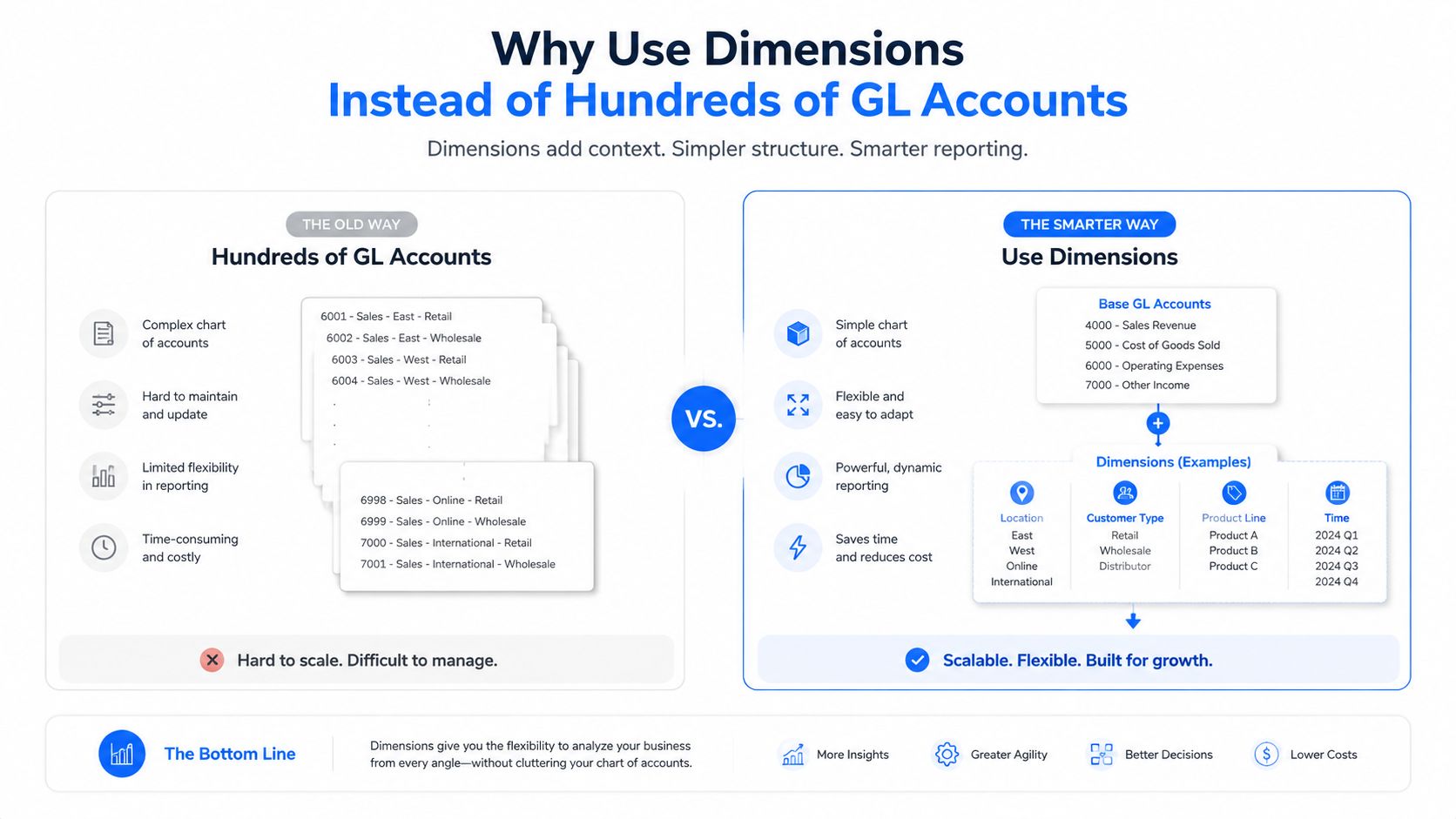
The most expensive COA mistake is adding an account whenever the organization adds a grant. A grant isn't a natural expense. A program isn't a natural expense. A funding source isn't a natural expense. Those are reporting dimensions.
Suppose the organization uses account 5100 for salaries. The transaction can carry separate values for Grant A, Youth Services, and Restricted Fund. The next grant still posts to 5100, with a different grant dimension. This is cleaner than creating separate accounts such as “Grant A Salaries” and “Grant B Salaries,” then repeating that pattern for travel, supplies, and every other cost category.
The lean GL test
A narrow COA paired with dimensions can deliver the same reporting granularity as a much larger flat structure. The relevant question isn't whether the ledger contains enough accounts. It's whether each reporting requirement has a reliable, controlled place to live.
A practical design might use:
- Account: Salaries, rent, travel, supplies, or professional fees
- Fund: Unrestricted or a donor-restricted fund
- Program: The mission activity receiving the cost
- Grant: The award or contract funding the activity
- Department: The internal operating owner
- Location: The site or entity where the activity occurred
Keep dimensions mutually exclusive. If a transaction needs two values from the same dimension, the dimension probably mixes unrelated concepts. Keep the dimension set manageable, and add a new dimension only when it supports a recurring management, compliance, or external reporting requirement.
What should not become a dimension
Don't turn every descriptive field into a reporting dimension. Vendor, employee, invoice, purchase order, and donor records already belong in the relevant subledger or operational module. Duplicating those attributes in the GL creates more coding work without improving financial control.
Grant tracking deserves particular attention. Guidance on nonprofit chart of accounts scalability recommends dimension-based tracking for grant-level reporting rather than creating unique accounts. That approach is especially useful for multi-site and grant-heavy organizations because the finance team can add a grant value without redesigning the account hierarchy.
The implementation decision is straightforward. Put durable economic categories in the chart. Put changing organizational relationships in dimensions. Configure validation rules so restricted transactions require the right fund or grant coding, and make dimensions mandatory only where the reporting need justifies the extra control.
For a Sage Intacct design, review how Sage Intacct dimensions can support this model before you finalize account numbers. Software alone won't fix a confused structure. The implementation partner must translate reporting requirements into usable dimensions, approval rules, mappings, and training.
Mapping Expenses for Form 990 and Functional Reporting
Natural expense classification answers what the organization spent. Functional classification answers why it spent it. Your nonprofit needs both, and the chart of accounts should capture each without forcing the finance team to create hybrid accounts.
An account named “Program Travel” looks precise, but it creates trouble when the same travel category supports a fundraising event or management meeting. Use a natural account such as 6200 Travel, then assign the functional classification through a controlled dimension or allocation process.
Build the mapping before posting
Start with the reports your organization must produce. The statement of functional expenses and Form 990 reporting require expenses to flow into program services, management and general, and fundraising. Your mapping should let the preparer move from the trial balance to those categories without a year-end spreadsheet exercise.
| GL Account | Natural Expense | Functional Dimension | Form 990 Line |
|---|---|---|---|
| 5100 | Salaries | Program services | Compensation and related expenses |
| 5400 | Rent | Management and general | Occupancy |
| 5600 | Program supplies | Program services | Occupancy and other expenses |
| 6200 | Travel | Fundraising | Travel |
| 6300 | Professional services | Management and general | Other expenses |
The table is a design example, not a universal mapping. Your organization should map each account to the appropriate Form 990 presentation based on the underlying activity and the instructions used by its tax preparer.
Shared costs need evidence
Some expenses support more than one function. Occupancy may serve program staff, finance staff, and development staff. Information technology may support program delivery and administration. Payroll may include employees whose time is split across functions.
Use a documented allocation methodology based on the facts of the organization. Possible drivers include time records, square footage, headcount, usage, or another reasonable measure that can be applied consistently. The key control isn't choosing a complex formula. It's documenting why the formula reflects how the resource is used and retaining support for the allocation.
Audit-ready means reproducible. A reviewer should be able to understand the driver, inspect the source data, and reproduce the allocation without relying on one employee's memory.
Joint costs require added care when an activity combines fundraising with program or educational content. ASC 958-720 includes requirements for allocating joint costs, and missing documentation can lead to audit adjustments or questions about functional reporting. Don't let a general “marketing” account hide the underlying purpose of a campaign.
Put the report inside the close
The Controller should review functional coding during monthly close, not after the fiscal year ends. Create exception reports for missing dimensions, unusual combinations, and expenses posted to accounts that don't map to a functional category. Then give the CFO a dashboard that shows natural and functional views from the same transaction population.
A reporting platform can support that operating model when the mappings, dimensions, and controls are configured together. Review Sage Intacct dashboards and reporting as part of the design discussion, but don't buy reporting features before deciding what the organization needs to measure.
QuickBooks vs Sage Intacct for Nonprofit Fund Accounting
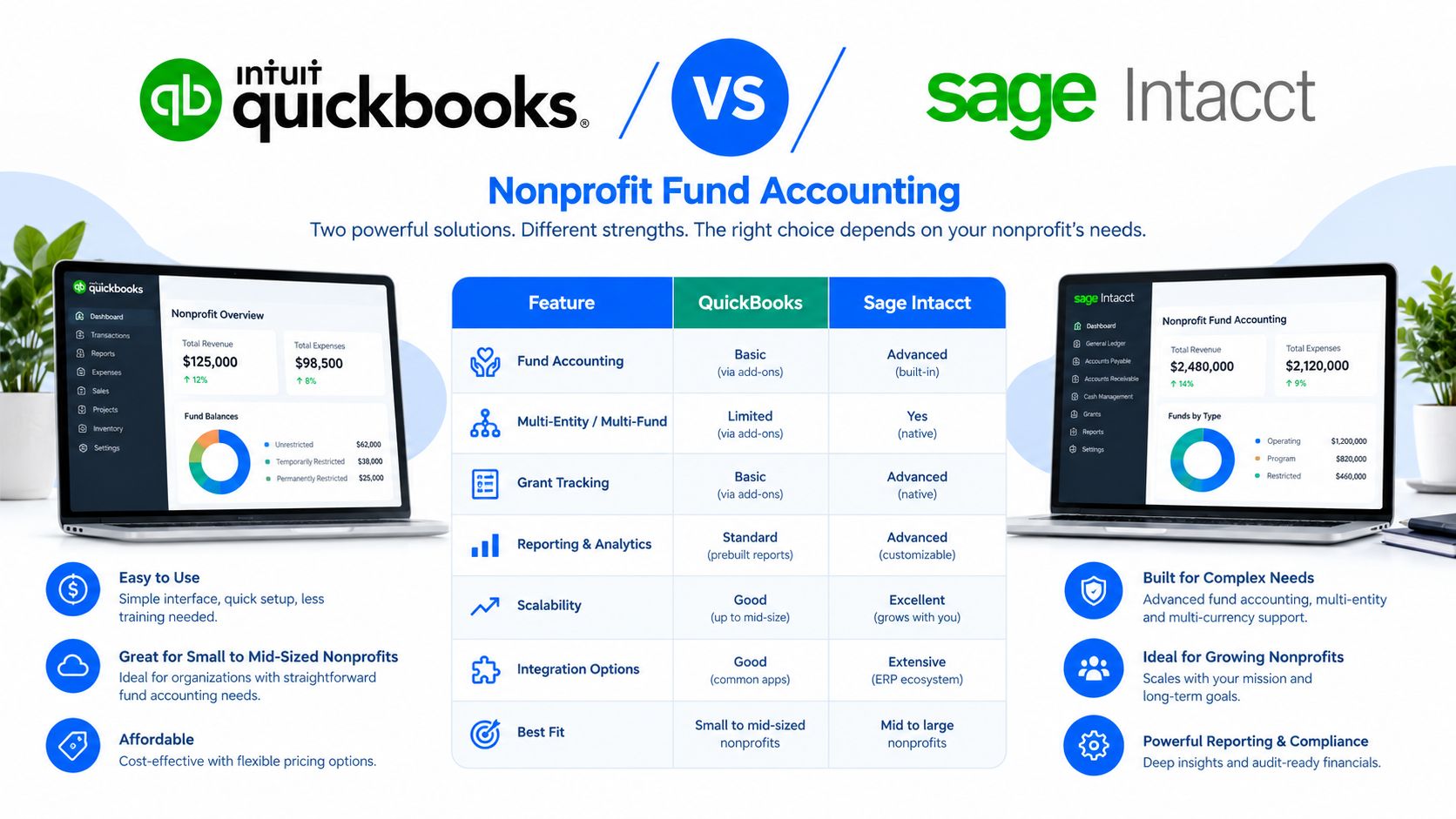
QuickBooks can support a straightforward nonprofit operation, especially when reporting needs are limited and the finance team can maintain disciplined classes and subaccounts. The strain begins when the organization needs to analyze the same transaction across several independent views, such as fund, grant, program, department, and location.
A QuickBooks-style structure often uses classes, customer or project fields, and subaccounts to simulate fund accounting. That can work for basic reporting, but the model becomes fragile when a single grant spans multiple programs or when restricted net asset releases need to be tied to documented activity. Staff start exporting data, combining reports, and maintaining a parallel reporting model outside the ledger.
Sage Intacct is built around dimensional accounting. The account can remain “Salaries,” while fund, program, grant, department, location, and other dimensions provide the reporting context. That keeps the GL easier to govern while allowing finance leaders to analyze combinations that would be awkward to represent as nested subaccounts.
Compare the operating models
| Finance need | QuickBooks-style approach | Dimension-driven ERP approach |
|---|---|---|
| Fund reporting | Classes and subaccounts | Fund dimension with controlled reporting |
| Grant analysis | Project fields, classes, or account expansion | Grant dimension across transactions |
| Functional expenses | Manual mapping and allocation | Natural account plus functional classification |
| Multi-entity reporting | Separate files or add-ons | Entity-aware consolidation and reporting |
| Board reporting | Exported reports and spreadsheet packages | Reusable dashboards and report books |
The decision shouldn't be based on software branding. It should be based on the cost of keeping the current architecture alive. Count the manual reconciliations, recurring spreadsheet transformations, audit requests, grant reports, and close delays. Then assess whether the existing platform can enforce the coding, approval, dimensional, and consolidation controls your organization now needs.
Migration also carries risk. A new ERP won't produce clean reports if the legacy COA is copied without redesign. The implementation team must decide which accounts to consolidate, how to map historical balances, how to handle restricted activity, and how to train program staff who create or approve transactions.
For organizations considering Sage Intacct, Sage Intacct core financials is the relevant starting point for evaluating the general ledger, accounts payable, purchasing, cash management, and reporting foundation. Lucentive is a Sage Intacct National Premier Partner with experience serving mid-market, healthcare, and nonprofit organizations, so the conversation can focus on implementation fit rather than a software demonstration in isolation.
Next Steps to Redesign Your Chart of Accounts
A COA redesign should begin with reporting failures, not account numbers. Pull the current account list, identify inactive and duplicate accounts, and trace the reports that require manual work. Include the Controller, program leadership, grant staff, executive team, and external auditor early enough to resolve competing definitions before configuration begins.
Phase one aligns the stakeholders
Document the reports that matter:
- Board financial packages
- Statement of activities
- Statement of financial position
- Statement of functional expenses
- Grant deliverables
- Form 990 support
- Liquidity and restricted fund reporting
Ask each stakeholder what decision the report supports and what transaction attributes it requires. This prevents the finance team from building dimensions that nobody uses and prevents program leaders from requesting grant-specific accounts that should be dimensions.
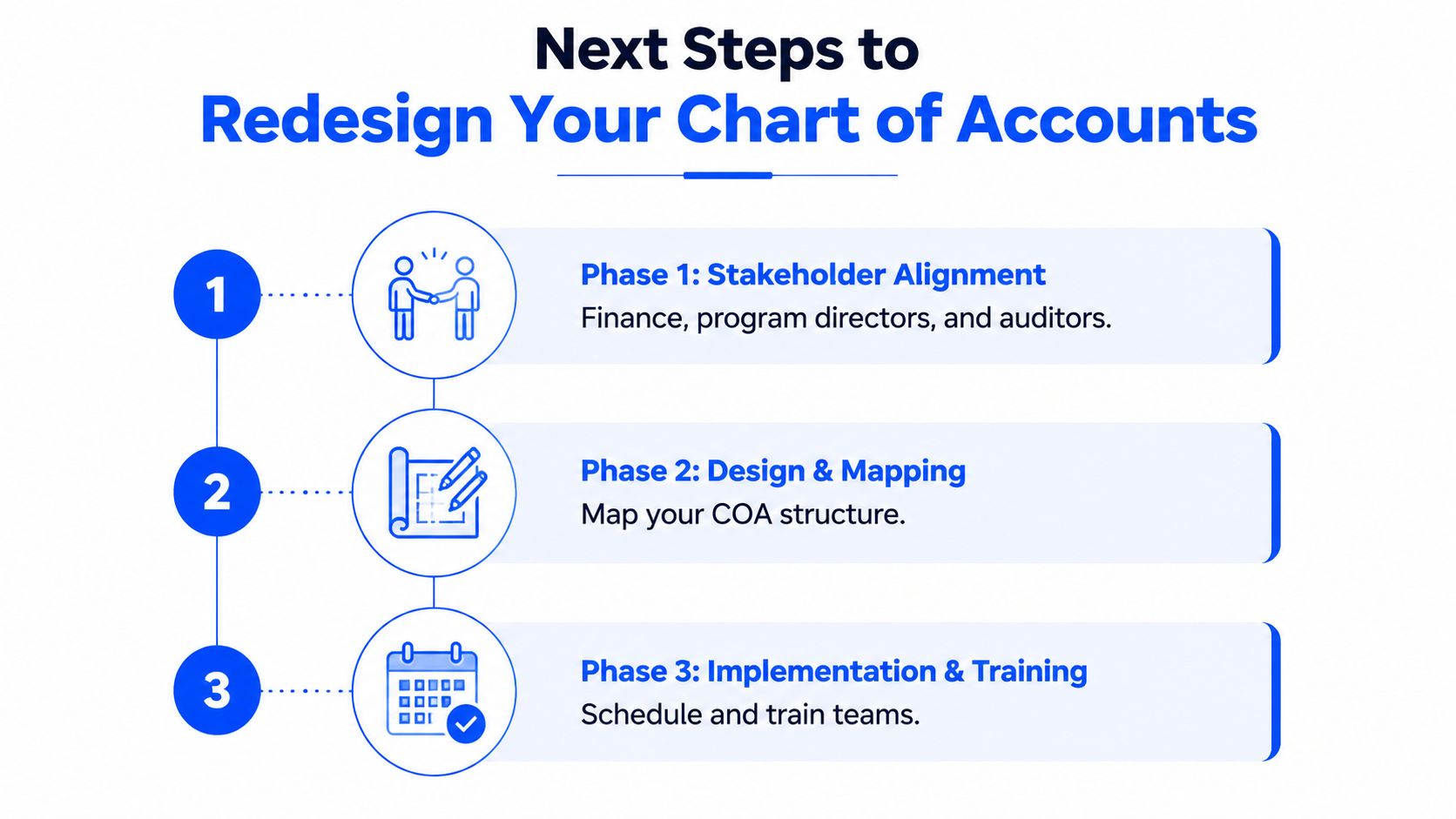
Phase two maps the structure
Set the account numbering convention, net asset policy, natural expense categories, functional mappings, dimension definitions, and allocation methodologies. Test the design against real transactions, including restricted grants, shared occupancy, payroll allocations, intercompany activity, and releases from restriction.
Then assess the current ERP. If it can't store and report the dimensions you need, or can't enforce the required coding controls, a platform migration may be the prerequisite for a successful redesign. If it can, configure the leaner structure without carrying forward obsolete accounts.
Phase three implements control
Build the COA, mappings, approval workflows, report books, dashboards, and conversion rules. Train people based on their role. Program managers need to understand coding decisions, while finance staff need to understand validation, reconciliation, and reporting controls.
Your Sage Intacct general ledger evaluation should include the design and implementation work, not only the subscription and configuration checklist. A partner should review the current COA, identify structural gaps, and show how the proposed model will support audit evidence, grant reporting, and scalable growth.
FAQ
What is a chart of accounts for a nonprofit?
A nonprofit chart of accounts is the framework used to organize assets, liabilities, net assets, revenue, and expenses in a way that supports both financial statements and mission-based reporting. Most organizations also need a way to separate program, administrative, and fundraising activity, which is why many nonprofit accounting guides recommend a lean account list supported by fund or dimension tracking (Jitasa).
What accounts should a nonprofit chart of accounts include?
At a minimum, nonprofits usually group accounts into assets, liabilities, net assets, revenue, and expenses. Within those categories, finance leaders typically create natural accounts for items like cash, receivables, payables, contributions, grant revenue, salaries, occupancy, and professional fees. The exact numbering can vary, but the structure should remain stable as programs and grants change.
How do nonprofits track restricted funds without creating too many accounts?
The most scalable approach is to keep the account tied to the natural transaction, such as salaries or rent, and use separate coding for the fund, grant, and program. This avoids a bloated ledger and makes it easier to report restricted activity consistently across audits, grant reports, and board packages. This is a common recommendation in nonprofit software and accounting guidance, especially for grant-heavy organizations (Giddings Consulting).
How should a nonprofit map expenses for Form 990?
Form 990 reporting usually requires expenses to be classified by both natural and functional category. In practice, that means finance needs to identify not only what was spent, but whether the cost belongs to program services, management and general, or fundraising. Building that mapping into the monthly close process reduces year-end cleanup and supports cleaner support for tax preparers and auditors.
Is QuickBooks enough for nonprofit fund accounting?
It can be, if the organization has relatively simple reporting needs and can manage disciplined use of classes, subaccounts, and manual workarounds. Research and product comparisons commonly note that limitations become more visible when nonprofits need multi-dimensional reporting across grants, funds, departments, locations, and entities, or when the close depends heavily on Excel (GRF CPAs, Sage).
When should a nonprofit move from QuickBooks to Sage Intacct?
A move usually becomes worth evaluating when finance teams face recurring manual reconciliations, delayed closes, audit strain, restricted-fund complexity, or grant reporting that basic tools cannot handle cleanly. Current comparisons also point out a major difference in cost and implementation effort, so the right time to migrate is not simply when the organization grows, but when the operational cost of staying put exceeds the cost of redesign and change (GRF CPAs, Ensync).
Lucentive can review your nonprofit's current chart of accounts, reporting requirements, and dimensional needs, then scope a practical Sage Intacct design around the gaps. Schedule a 30-minute working session with the Lucentive team or request a tailored Sage Intacct demo by visiting Lucentive so you can assess fit before buying software or attempting a redesign alone.