Two days before month-end, the CFO of a growing engineering services firm is reconciling project costs across nine spreadsheets, chasing missing timesheets through email, and trying to explain why one project manager charged hours to a closed work breakdown structure element. The general ledger is accurate in isolation, but it can't answer the questions leadership needs answered: Which projects are profitable? Which contracts are drifting? What revenue should be recognized this month? Which entity owns the cost?
That isn't a spreadsheet problem. It's a structural capability gap. The firm lacks a system that connects project structure, time capture, billing rules, revenue recognition, and the general ledger without repeated rekeying or manual reconciliation.
For CFOs, Controllers, CEOs, and VPs of Finance, selecting project accounting software shouldn't be a feature-shopping exercise. The decision affects close discipline, margin protection, audit evidence, forecasting, and the finance team's ability to support growth. The right platform matters, but the implementation partner often determines whether the platform becomes a reliable operating system or an expensive database nobody trusts.
The framework below starts with what the software must do, maps the market into four practical tiers, compares the platforms most likely to appear on a mid-market shortlist, and then addresses the decision buyers often underestimate: who will configure and implement the system.
Table of Contents
- The Month-End That Never Ends
- What Project Accounting Software Does
- How the Market Is Structured
- Tier 1 Platforms Compared Head to Head
- Tier 2 Platforms Worth Considering
- How Fixed-Fee Revenue Recognition Works
- Matching the Right Platform to Your Buyer Profile
- Why the Partner Matters as Much as the Software
The Month-End That Never Ends
The CFO's first reconciliation shows one project under budget. The second spreadsheet shows a different labor total. The project manager's timesheet includes work posted to a closed WBS element, and the billing schedule doesn't match the latest change order. Meanwhile, the accounting team is waiting for approvals before it can close the period.
Every individual workaround looks manageable. Together, they create a finance process that depends on memory, inbox searches, spreadsheet version control, and late-night judgment calls. The company may have a sound general ledger, but the GL only receives the result of project activity. It doesn't govern the project structure, validate the time entry, apply the contract's billing rules, or explain why recognized revenue changed.
That distinction matters for firms delivering engineering, consulting, healthcare, construction, nonprofit programs, or other work organized around contracts and engagements. Project accounting software connects the operational event to the financial outcome. A time entry should relate to a project and task. An approved expense should flow to the right cost structure. A billing rule should produce an invoice or revenue entry that finance can trace back to the underlying work.
Practical rule: If your team still has to reconcile project facts from several systems before it can trust the project P&L, you haven't solved project accounting. You've added another reporting layer.
A properly scoped Sage Intacct implementation can address that gap, but only when the project model, dimensions, approval rules, integrations, and close procedures are designed together. Software alone won't decide how your organization defines a project, handles a change order, or assigns responsibility for an exception.
The market breaks into four useful tiers, from deep project platforms to advanced entry-level accounting tools. The sections that follow use a consistent yardstick: project structure, time and expense capture, billing, revenue recognition, WIP, profitability reporting, multi-entity control, implementation burden, and total cost of ownership.
What Project Accounting Software Does
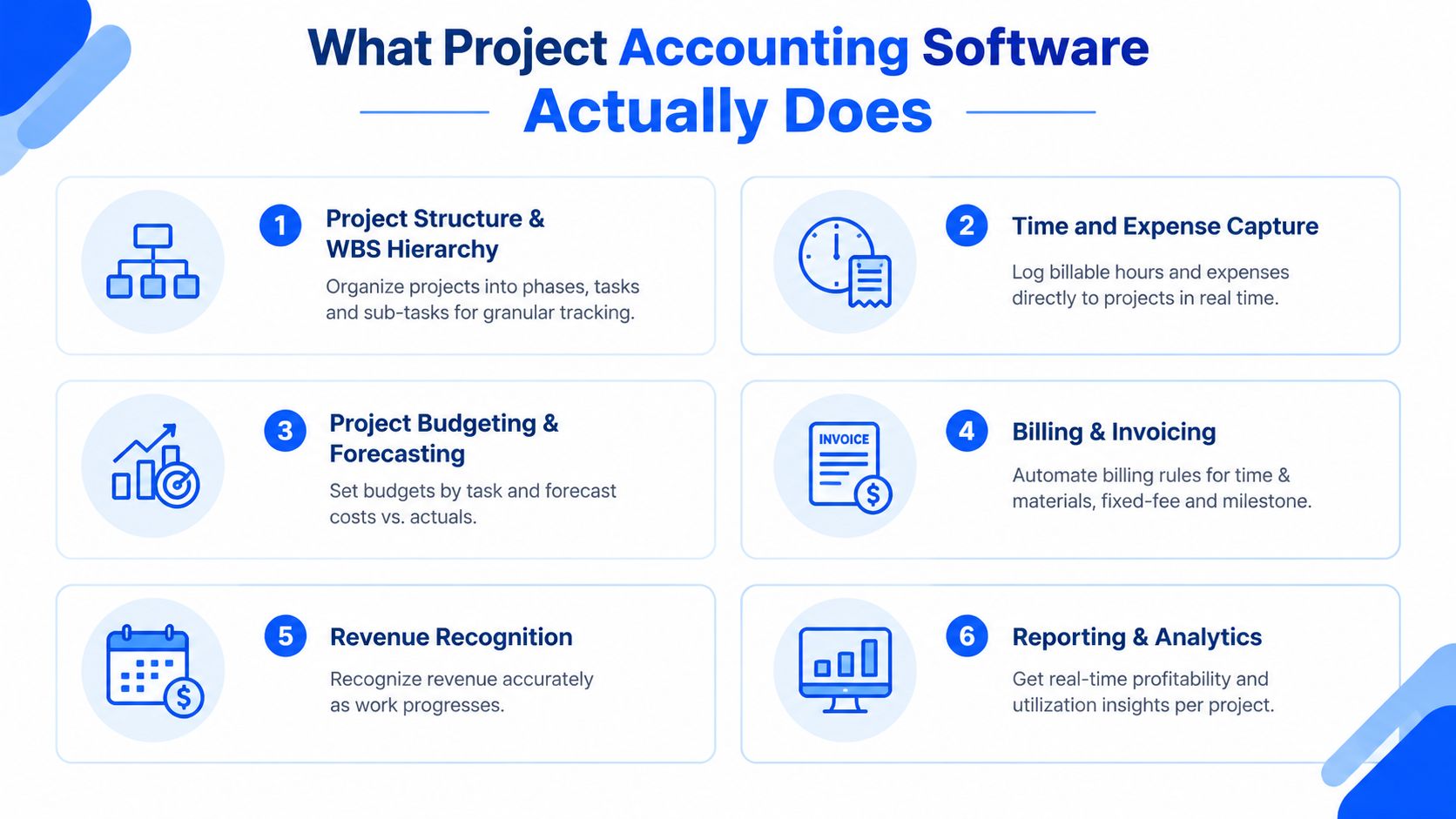
A generic GL records debits and credits, but project accounting must also explain how each entry relates to a contract, phase, task, person, entity, and billing obligation. That connection should guide every platform evaluation.
Start with the project structure
A project needs more than a customer name. The system should support phases, tasks, and sub-tasks, often organized as a WBS. This hierarchy gives finance and delivery teams one structure for tracing cost, revenue, progress, and billing. Without it, staff push important detail into spreadsheets or create inconsistent codes that weaken reporting.
Time and expense capture follows. Employees should record hours and expenses against the correct project activity, while approval controls block closed tasks, invalid codes, and unbillable work from entering the financial process. Mobile access helps field and distributed teams submit information while the work is fresh instead of rebuilding it at month-end.
Match billing to the contract
Evaluate support for time and materials, fixed fee, cost-plus, milestone, and retainer billing. Rate tables, reimbursable expenses, caps, retainage where applicable, and task-level invoice detail also belong in the test plan. Delivery can record one version of the work, billing another, and finance may then spend the close reconciling both.
Revenue recognition needs a separate test. The platform should handle milestone and percent-complete methods, align recognized revenue with measurable progress, and connect that progress to project costs. Sage Intacct documents fixed-fee setup, percent-complete templates, schedule updates, and review before posting in its percent-complete revenue recognition documentation.
Make project performance visible
Reporting is the point of project accounting. Finance should review budget versus actual cost, WIP, earned revenue, billed revenue, backlog, margin, utilization, and forecast completion without building a separate workbook. Dashboards should drill from an executive result to the transaction, approval, or time entry behind it.
Test multi-entity and intercompany processing as well. A growing firm may need reporting by entity, shared customers, multiple currencies, eliminations, and consolidated financial statements. Export-based workflows and spreadsheet joins become harder to control as legal entities and operating units increase.
Professional services organizations should compare Sage Intacct for professional services with their real billing and reporting model. The right decision depends on project structure, controls, implementation requirements, and partner capability, not a feature checklist alone.
How the Market Is Structured
The category is broader than the vendor lists suggest. Some products are project-led systems with financial capabilities. Others are financial management platforms with deep project modules. Still others add basic project tracking to an accounting product.
Market sizing reinforces the need for definition. One independent estimate values the broader global accounting software market at USD 19.38 billion in 2024 and projects USD 31.25 billion by 2030, with an 8.4% compound annual growth rate from 2025 through 2030. Project accounting estimates vary substantially, including one estimate of USD 1.14 billion in 2025 and another of USD 4.8 billion in 2025, because publishers define the category differently. The figures and projections appear in the project accounting software market estimate.
Use the tiers below to locate your needs before comparing brand names.
| Tier | Typical Buyer Profile | Annual Deal Size Band | Implementation Model | Avg Reviewer Sentiment (G2/Gartner) |
|---|---|---|---|---|
| Tier 1 | Mid-market and enterprise firms with complex projects, contracts, entities, or revenue rules | Custom quote | Partner-led discovery, configuration, migration, integration, and training | Strong feature depth, with usability trade-offs |
| Tier 2 | Organizations needing broader ERP coverage or a lower-cost project layer | Custom or modular pricing | Vendor or partner deployment, often with narrower scope | Generally positive, but depth varies by module |
| Tier 3 | Finance-led organizations needing project dimensions, billing, and reporting without a heavy PSA | Custom or subscription pricing | Guided implementation or focused partner engagement | Easier adoption, lighter project controls |
| Tier 4 | Small project shops still operating effectively with entry-level accounting tools | Lower-cost subscription or existing license | Self-service, accountant-led, or light consulting | Accessible, but limited for complex projects |
Independent review comparisons illustrate the trade-off. Deltek Vantagepoint and Oracle Fusion Project Portfolio Management are each rated around 9.4 out of 10 for features, while Sage Intacct Project Accounting is rated 8.7 out of 10 for features and 7.6 out of 10 for ease of use in one comparison set, as reported by independent project accounting software reviews. More depth usually means more configuration decisions, stronger controls, and a steeper adoption curve.
Cloud deployment is now central to the category. One market source reports that cloud-based deployment represented 65.3% of the market in 2025 and projects it to reach 73.8% by 2034. The same source reports software at 65.0% of the market in 2025, compared with 35.0% for services, a useful reminder that implementation support remains part of the buying decision even as standardized platforms expand. Review the best accounting software for professional services with that distinction in mind.
Tier 1 Platforms Compared Head to Head
Tier 1 platforms earn consideration when project financials are central to the operating model. They aren't interchangeable, and the right choice depends on whether your hardest problem is project lifecycle control, dimensional financial reporting, or global consolidation.
Sage Intacct is often the strongest fit for a finance-led mid-market organization that needs project dimensions, multi-entity accounting, budget-versus-actual reporting, and flexible revenue recognition without adopting a large enterprise suite. Its Construction and Nonprofit editions matter for organizations with specialized reporting and compliance needs. The trade-off is that the model must be designed carefully. Poor dimensions, weak approval rules, or incomplete integrations will leave users recreating the same workarounds in a newer interface.
Deltek Vantagepoint pulls ahead when professional services operations, resource planning, project lifecycle management, and government contracting requirements dominate the evaluation. It offers deep professional services domain coverage and is a natural contender where DCAA-compliant workflows and project delivery controls are decisive. That depth can frustrate buyers who want a faster, finance-first deployment with fewer operational dependencies.
Oracle NetSuite OneWorld is compelling for organizations prioritizing international entities, multi-currency operations, and global consolidation. It provides broad ERP coverage and can support complex organizational structures. The cost is scope and implementation complexity. Finance leaders should confirm that the project module, revenue rules, reporting model, and integrations work for their specific delivery processes rather than assuming the broader ERP footprint solves project accounting automatically.
| Criterion | Sage Intacct | Deltek Vantagepoint | Oracle NetSuite OneWorld |
|---|---|---|---|
| Project WIP and revenue recognition | Strong, with configurable project and contract processes | Strong, especially for professional services delivery | Strong, subject to configuration and module scope |
| Multi-entity and multi-currency | Strong mid-market control and consolidation | Capable, with services-oriented emphasis | Particularly strong for global structures |
| Time and expense capture | Strong with appropriate workflows and integrations | Deep project and services orientation | Capable, often dependent on configuration and connected tools |
| Reporting granularity | Strong dimensional reporting by project, entity, and operational attributes | Strong project and resource reporting | Broad ERP reporting with substantial setup |
| Ecosystem | Finance, industry, and integration ecosystem | Professional services and project-focused ecosystem | Broad enterprise ERP ecosystem |
| Total cost of ownership | Mid-market investment with partner configuration | Premium project depth and implementation effort | Broad platform investment with significant scope |
The practical recommendation is simple. Start with the accounting model, not the demo script. A platform that looks impressive in a generic walkthrough may still fail your fixed-fee, intercompany, WIP, or contract-change scenarios. Sage Intacct's overview is a useful starting point for buyers whose center of gravity is finance control with serious project accounting.
Tier 2 Platforms Worth Considering
Tier 2 products can be sensible when the organization has a clear constraint, such as an existing technology standard, a smaller project operation, or a need to control license cost. They become dangerous when a buyer chooses them because the demo feels easier, then discovers that the missing controls were the reason the company started shopping.
Microsoft Dynamics 365 Project Operations deserves a close look when the organization already relies on Microsoft finance, customer relationship management, reporting, and collaboration tools. The integration story can reduce friction across the existing stack. The buyer still needs to validate revenue recognition, project WIP, time capture, and entity requirements in the proposed architecture rather than relying on the Microsoft brand to fill functional gaps.
QuickBooks Enterprise with project tools works for a very small project shop with straightforward billing, limited entities, and modest reporting needs. It can be a practical holding pattern when the business isn't ready to replatform. It isn't a substitute for Tier 1 project accounting when contracts, revenue schedules, audit evidence, or multi-entity consolidation have become material.
Acumatica Project Accounting is worth considering for organizations that care strongly about deployment flexibility and consumption-based access. Its open API can also appeal to nonprofits and other organizations with specialized systems. Buyers should test grant, fund, project, and invoice reporting together, because a good integration surface doesn't automatically create a complete accounting design.
| Criterion | Dynamics 365 Project Operations | QuickBooks Enterprise + Project Tools | Acumatica Project Accounting |
|---|---|---|---|
| Project WIP and revenue recognition | Capable, dependent on solution design | Limited for complex methods | Capable, but validate required scenarios |
| Multi-entity and multi-currency | Strong within the Microsoft architecture | Limited compared with mid-market ERP | Flexible, subject to configuration |
| Time and expense capture | Strong when connected to Microsoft workflows | Basic to moderate | Capable with configured workflows |
| Reporting granularity | Strong with the broader Microsoft data model | Practical for simpler operations | Flexible, including API-led extensions |
| Ecosystem | Best for Microsoft-standardized organizations | Broad small-business ecosystem | Open integration and ERP ecosystem |
| Total cost of ownership | Can grow with modules and implementation scope | Lower initial burden, higher workaround risk | Pricing and usage model require careful scoping |
The question isn't whether these products can track a project. They can. The question is whether they can support the controls your Controller will need after the business adds entities, contract types, reporting dimensions, and audit scrutiny. A clear multi-entity accounting software assessment should expose that gap before purchase.
How Fixed-Fee Revenue Recognition Works
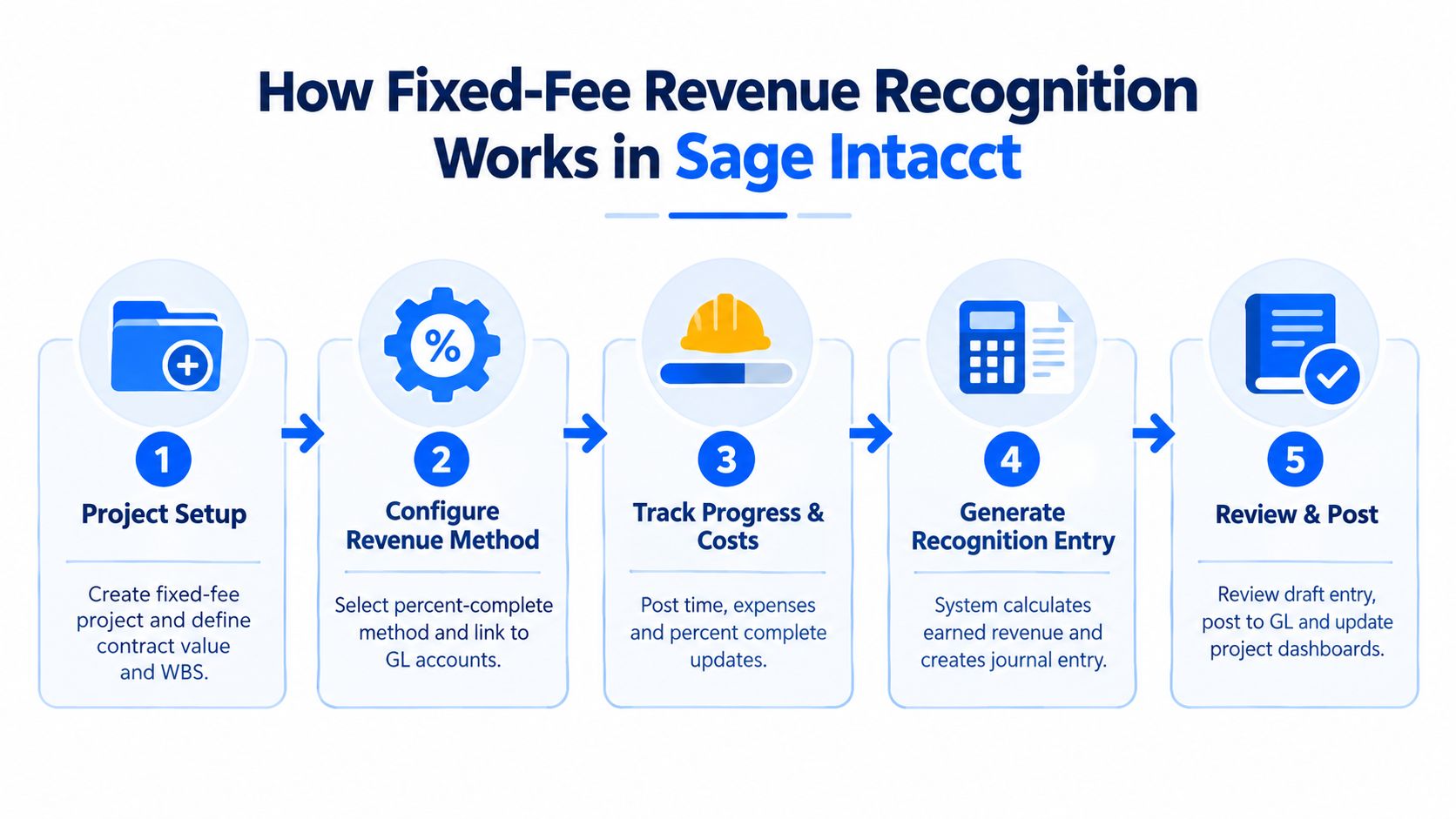
Fixed-fee accounting is where superficial project tools usually fail. The system must connect a contract value to a project structure, measure progress using an approved method, calculate earned revenue, and post entries that finance can review and trace.
Sage Intacct's documented setup starts with the project or task. Set Billing type to Fixed fee or Fixed fee and expenses. Then configure the contract line with Billing method set to Fixed price and attach a percent-complete revenue template. The template defines how progress drives recognition, while the project structure supplies the work and cost context.
Configure the method before posting activity
The finance team must enter the project budget and define the allocation basis before expecting reliable results. Depending on the project design, percent complete may be driven by cost-to-cost progress, cost-plus logic, milestones, or another approved measure. Oracle NetSuite documents a related control in which the system can calculate completion from time logged against a project, while an entered Percent Complete value overrides the automatic calculation. That distinction is documented in Oracle's percent-complete guidance.
Sage Intacct also supports threshold-based recognition templates. Threshold values must be entered in ascending order, from the least complete stage to the most complete stage, according to the project revenue recognition template instructions. That detail sounds minor, but configuration errors at this stage can produce confusing month-end results.
Run, review, and post
At close, run the Update percent complete schedules process. Preview the resulting entries, investigate unexpected WIP or revenue movements, and post only after the Controller approves the calculation. The project dashboards and general ledger should then reflect the same recognized revenue and related cost.
The common traps are operational rather than theoretical:
- Misclassified costs: Labor, subcontractor, and reimbursable costs must land in the correct project categories.
- Wrong allocation base: A percent-complete calculation is only as credible as the budget and progress measure behind it.
- Ignored change orders: An approved scope change that never reaches the contract or budget will distort both progress and margin.
- Weak review evidence: Finance needs an audit trail showing who updated, reviewed, approved, and posted the schedule.
Project accounting software doesn't eliminate judgment. It makes the judgment repeatable, visible, and supportable.
Matching the Right Platform to Your Buyer Profile
The right tier depends on the operating model, not the size of the software budget. Four buyer profiles illustrate how the evaluation changes.
| Buyer Profile | Typical Size | Recommended Tier | Top Fit Reason | Escalation Trigger |
|---|---|---|---|---|
| Multi-entity professional services firm | Mid-market and growing | Tier 1 | Project lifecycle, consolidation, and revenue control | Global reporting, complex currencies, or government-contracting requirements |
| Project-based healthcare organization | Mid-market or multi-site | Tier 1 | Dimensional reporting and flexible project revenue treatment | More entities, specialized integrations, or tighter audit demands |
| Nonprofit tracking restricted grants | Growing nonprofit or faith-based organization | Tier 1 or carefully scoped Tier 2 | Fund, grant, project, and reporting flexibility | Grant detail, indirect cost allocation, or compliance reporting outgrows workarounds |
| QuickBooks outgrower | Growing small to mid-sized business | Tier 1, with Tier 4 as a temporary option | Controls, multi-entity support, and scalable cloud financials | Manual close, spreadsheet reporting, project margin surprises, or audit risk |
The multi-entity services firm
If global reporting is the primary concern, NetSuite OneWorld deserves attention for its consolidation and multi-currency strengths. If professional services delivery, resource management, or government-contracting discipline dominates, Deltek Vantagepoint may be the better functional fit. Sage Intacct sits between those priorities for finance teams that want dimensional project reporting and multi-entity control without adopting the broadest ERP footprint.
Healthcare project work
Healthcare organizations often need to connect project or program costs to locations, service lines, entities, and revenue categories. Sage Intacct's dimensional model and configurable revenue processes make it a strong candidate, provided EMR, billing, payroll, and operational integrations are designed before the proposal is finalized.
Nonprofit grant tracking
Nonprofits shouldn't select a platform solely because it has a project screen. Test restricted funds, grant budgets, indirect cost allocation, donor or program reporting, and audit support as a single process. Acumatica may appeal where open API access and flexible reporting are central, while Sage Intacct's nonprofit capabilities merit comparison when finance needs stronger controls and multi-entity visibility.
The QuickBooks outgrower
A company that has outgrown QuickBooks usually notices the problem through symptoms: the close depends on spreadsheets, project managers don't trust budget reports, and leadership receives financial answers after the decision window has passed. QuickBooks Enterprise can remain appropriate if projects are simple. Once the company needs consistent dimensions, formal revenue recognition, stronger approvals, or multi-entity reporting, moving to Sage Intacct is usually more rational than layering on more disconnected tools.
Why the Partner Matters as Much as the Software
Most implementation failures aren't caused by a missing checkbox. They happen because the buyer never made the hard design decisions before configuration began.
A project accounting implementation must define the chart of accounts and project dimensions together. It must determine which attributes belong in the ledger, which belong in the project structure, and which should be handled through integrations. It must configure revenue recognition templates, build reports that match management decisions, migrate usable historical data, and connect billing, payroll, expense, CRM, or operational systems without creating duplicate sources of truth.
A software-only purchase leaves those decisions to the customer. That usually means finance designs the accounting model, operations protects its workflow, IT manages integrations, and nobody owns the end-to-end result.
What a qualified partner owns
The implementation partner should lead discovery around actual transactions and close procedures, not just conduct feature demonstrations. Ask for a working session that traces one project from contract setup through time entry, approval, billing, revenue recognition, WIP, reporting, and period close.
The partner should also:
- Design the dimensions: Establish project, entity, department, location, fund, grant, customer, and service-line structures that support both statutory accounting and management reporting.
- Configure revenue rules: Translate fixed-fee, milestone, time-and-materials, retainer, and percent-complete requirements into repeatable templates and approval controls.
- Plan migration: Decide what historical detail must move, how opening balances will be validated, and how legacy project data will support comparative reporting.
- Test exceptions: Include change orders, rejected time, closed tasks, intercompany activity, currency differences, credit memos, and incomplete project data.
- Train by role: Controllers, project managers, billers, executives, and employees entering time need different training and different success criteria.
Warning signs include a fixed-bid implementation that skips discovery, offshore-only delivery with no accountable local lead, and no reference customers in your industry or project model. A partner that can't explain how it will test revenue recognition and close controls hasn't earned the right to configure them.
Lucentive is a Sage Intacct National Premier Partner with experience serving mid-market organizations, including healthcare and nonprofit clients. Its role in a project like this is not just to turn on modules. The value lies in connecting the financial design, operating workflow, integrations, migration, and user adoption so the system supports the way the organization manages work.
The partner decision is the most critical decision in the selection process. A strong platform with weak implementation becomes an expensive collection of partial workflows. A well-designed implementation gives the CFO a controlled close, project-level visibility, and an audit trail the finance team can explain.
A short, no-pressure working session is a better next step than another generic demo. Schedule a 30-minute working session with Lucentive to walk through your project structure, billing models, revenue recognition, entities, and QuickBooks pain points, then see whether Sage Intacct fits your operating model. Visit Lucentive to request a Sage Intacct conversation and bring the people who will sign off on the investment.