Ask a retail finance director which store is actually making money and you usually get a confident answer about the top two, a confident answer about the worst one, and a vague shrug about everything in the middle. The middle is where the money is.
Retail accounting software is supposed to close that gap, and the reason it often does not is that the ledger was never set up to answer the question. Sales arrive from the point-of-sale system as one lump per day, occupancy sits in a single rent account, freight is buried in cost of sales. By the time margin can be attributed to a store, the month has been over for three weeks and the decision it would have informed is already made.
What follows is the implementation view: what the financial system has to handle for a multi-store retailer, what it should deliberately not try to handle, and the specific design decisions that determine whether you get store-level margin in the first week of the month or never.
Key Takeaways
- This is the financial layer, not a point-of-sale or merchandising system. You keep those, and the integration is the real project.
- The single highest-leverage decision is the granularity of the daily sales journal from your POS. Decide it before anyone builds an interface.
- Store, channel and department belong in dimensions, not in account numbers. That is what keeps the chart of accounts small and store-level reporting free.
- Set the retail fiscal calendar during configuration. A 4-4-5 or 13-period year is straightforward to set up and disruptive to change later.
- Marketplace and card settlement timing is the most underestimated reconciliation work in a multi-channel implementation. Scope it explicitly.
Screenshots throughout are Sage Intacct product material. The figures shown in them are Sage’s demonstration data, not Lucentive client results.
What retail accounting software has to handle that generic accounting does not
Retail accounting software has to absorb high-volume sales from several systems and channels, carry inventory at cost through to margin, split every dollar of revenue and cost by store, and close on a retail calendar rather than a normal one. Generic accounting handles none of that without either heavy customisation or a spreadsheet in the middle.
The requirements that come up in every retail scoping session are worth listing plainly. Daily sales summarised by store and tender type, so cash, card and gift card settle separately. Inventory valued consistently across locations with a costing method that survives audit. Landed cost, because freight and duty belong in the goods rather than in a year-end expense account. Occupancy and payroll allocated per store so that store profit and loss means something. Gift card and loyalty balances carried as liability until redemption. And a fiscal calendar matching how retailers actually compare weeks.
Every one of those is a design decision rather than a feature you switch on. That is the honest difference between reading a capability list and running an implementation.
Core financials: the close, the chart of accounts and the store dimension
Core financials are the general ledger, accounts payable, accounts receivable, cash management and the reporting on top. For retail the important part is not the module list. It is that store, channel, department and category are held as dimensions on every transaction rather than encoded into account numbers, which is what makes store-level reporting a filter instead of a rebuild.
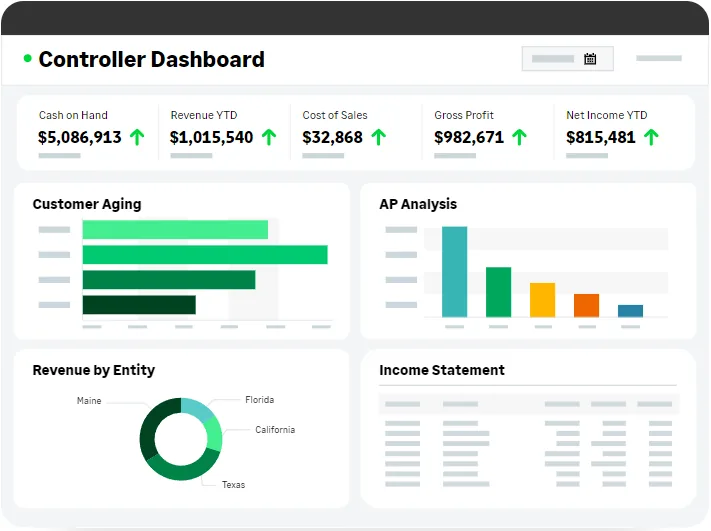
Retailers arriving from a small-business ledger almost always bring an oversized chart of accounts, because the only way to report by store was to create accounts per store. Forty stores times a dozen expense categories produces a chart nobody can maintain. Rebuilding that as one clean account list plus a store dimension is usually the largest single simplification in the project, and it is what makes adding store forty-one an afternoon rather than a chart of accounts exercise. Our explanation of how dimensions work and how to design them is the thing to read before the first workshop.
The other core-financials decision is the fiscal calendar. Retail runs on 4-4-5, 13-period or similar structures so that comparable weeks line up year on year. The calendar is held separately from transaction dates, which is what makes those structures work properly rather than approximately. Set it during configuration. Changing it after a year of postings is possible and genuinely unpleasant, and it affects every comparative you have built. There is more on what the close itself looks like in our comparison of core financials against a QuickBooks close.
Inventory management, and where the real work is
Inventory management here covers items, warehouses and locations, receipts, transfers, shipments, counts and the valuation that flows into cost of sales. It is a proper inventory sub-ledger rather than a periodic journal. What it is not is a merchandising or replenishment system, and being clear about that boundary early saves a lot of disappointment later.
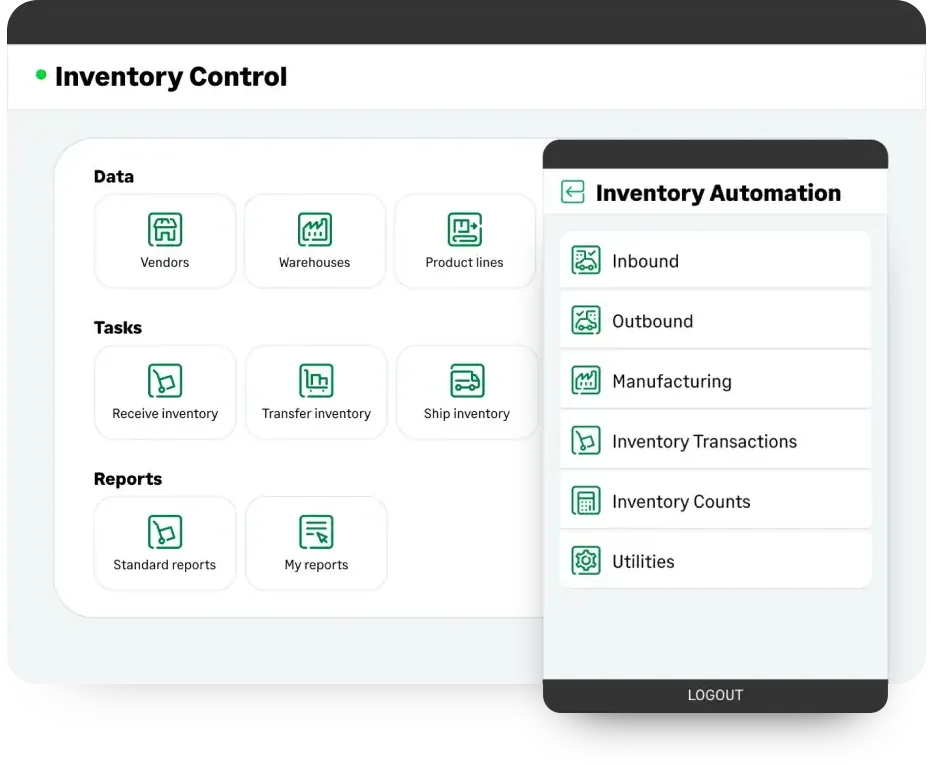
The design work sits in three places. Costing method comes first, because it determines how margin is calculated and it is not something you want to revisit after a year of history. Second is the location model: whether each store is a separate inventory location, whether transfers between stores are tracked, and whether the accounting recognises goods in transit. Third is the count and adjustment process, including who is allowed to post a shrink adjustment and at what threshold approval is required. That third one is a controls question wearing a software costume, and it is worth as much attention as the first two.
Be realistic about what it fixes. You get accurate valuation, visible shrink and a clean cost of sales. You do not get advice on what to buy or when to reorder, and count accuracy will not improve if nobody counts. Retailers running distribution alongside their stores should read our piece on wholesale and distribution accounting, because the inventory design overlaps heavily.
Multi-channel sales management and the path from order to cash
Multi-channel sales management means every selling channel lands in one ledger with the channel identified: physical stores, your own ecommerce site, marketplaces and any wholesale accounts. Revenue, cost of sales and margin are then reportable by channel and by store without anyone exporting anything, which is normally the first thing leadership asks for.
Not every channel takes payment at the till. Trade and wholesale accounts are invoiced, and memberships or subscription boxes bill on a schedule, so part of your revenue arrives through receivables rather than through settlement and has to stay readable by customer and by billing type. Confirm during scoping which of your channels bill and which settle, because the two are built differently.
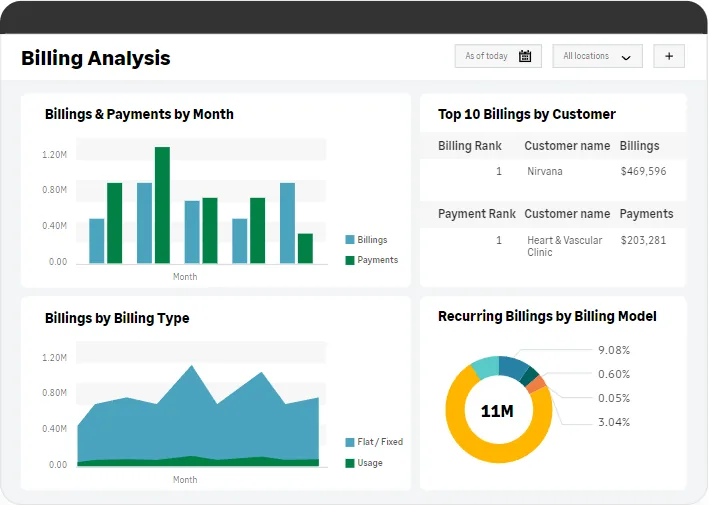
The integration design is the whole project, and it comes down to granularity. Almost nobody should post individual retail transactions into the general ledger. The workable pattern is a summarised daily journal per store, split by tender type and by whatever categories you genuinely report on, with the transaction-level detail staying in the point-of-sale system where it belongs. Deciding that split is a finance decision, not an IT one, and it needs the person who will actually read the resulting profit and loss in the room.
Settlement is underestimated every time. Card processors and marketplaces pay net of fees, on their own schedule, sometimes batching several days. The cash arriving in the bank rarely matches the sales recorded on the day they happened, and the clearing accounts holding that difference need designing rather than improvising. If you sell through several marketplaces, scope it as real work. Our overview of the order-to-cash process covers the wholesale side of the same problem, and what order processing involves is a useful primer.
Store-level margin, and what changes in your week after go-live
The change worth buying is that store-level margin becomes available continuously instead of at month-end. Revenue, cost of sales, occupancy and payroll all carry the store dimension, so a store profit and loss is a filter rather than an assembly job, and it is current rather than three weeks old.
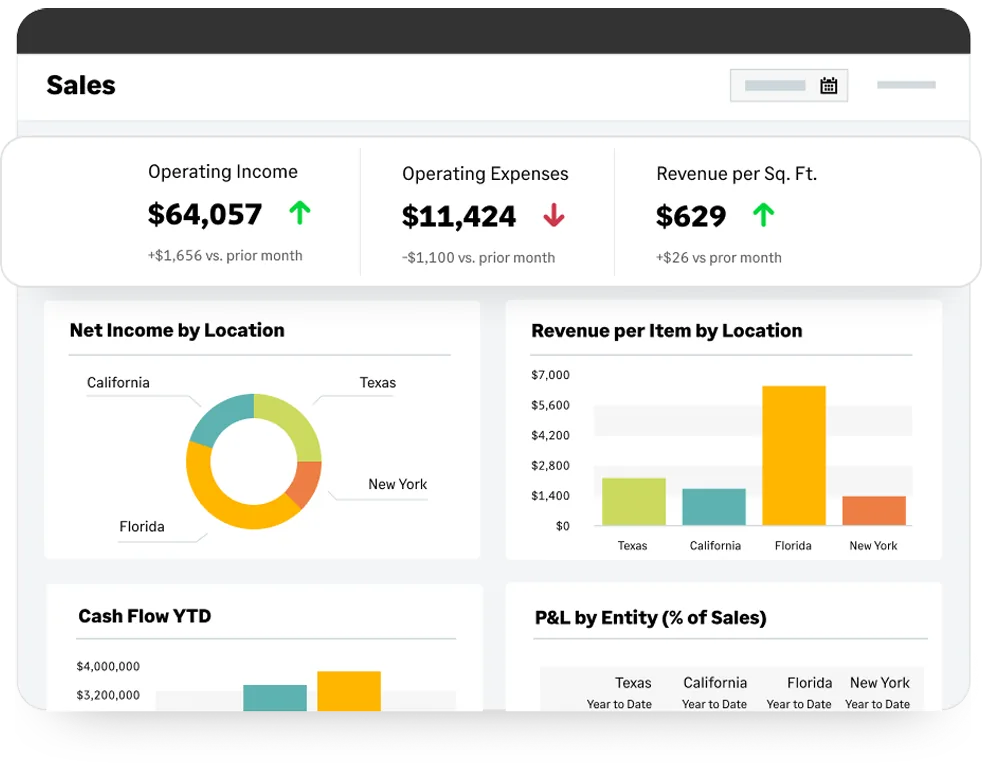
Revenue per square foot sitting next to operating income, as in the view above, is the shape of the change. Those two numbers together are how retailers actually judge a site, and producing them monthly by hand is exactly the kind of work that quietly consumes an analyst. Produced automatically, they become something a regional manager looks at on a Tuesday rather than something finance publishes on the twentieth.
[DATA: Lucentive’s measured reduction in close time across recent multi-location retail implementations — Rich to confirm]
Hear the trade-offs honestly. The numbers only improve if allocation rules for shared costs are agreed and defensible, and that conversation is political rather than technical. Store managers will challenge their allocations in the first quarter, and they should. Someone has to watch the daily interface for the day it silently fails, because a missing sales journal is far easier to spot on day one than at month-end. And visibility creates appetite: once leadership can see store margin, they will ask for category margin next.
Why retail stores choose it, and where implementations get stuck
Retailers move to this class of system for three reasons that come up repeatedly: they have outgrown a ledger that cannot report by store without an export, they are opening sites faster than their finance process can absorb, and they have added a channel that does not reconcile cleanly against the old setup.
If none of those three describes you, be sceptical about the business case. The review-site evidence points the same way, and it is worth reading precisely. G2 compiles its badges from user reviews of the product, which makes them a fair signal about the software and no signal at all about the firm implementing it. Ask any partner for retail references instead, and ask what went wrong on the last one.
The POS interface is scoped as an IT task
It is a finance design decision delivered by IT. If the granularity is chosen by whoever writes the interface, you will get either unusable detail or unusable summary. Have the person who reads the profit and loss specify the split.
Inventory opening balances are not counted
Migrating an inventory valuation nobody has physically verified means every margin figure afterwards inherits that error. Do a full count at cut-over. It is disruptive, it is the right call, and every retailer who skipped it has regretted it inside two quarters.
The fiscal calendar is left at default
Configuring a standard calendar and discovering in month four that the business compares weeks is a painful conversation. Confirm the calendar with whoever produces the trading reports, in writing, in week one.
Nobody owns the daily reconciliation
Sales-to-settlement reconciliation is a daily habit, not a monthly one. Name the person, put it in their day, and build the exception report they will use. Automation moves this work rather than removing it.
One more thing worth saying plainly. The page this article replaces closed with a gated analyst report and an infographic. Those describe capability, which is the easy part and the part every vendor gets right. Neither can tell you whether your POS data can be summarised the way your profit and loss needs it, which is the question that actually decides whether this works.
Summary
For a multi-store retailer, the value is store-level margin you can trust, produced continuously, without an analyst rebuilding it. The route there is specific: dimensions instead of an inflated chart of accounts, a retail fiscal calendar set at the start, a daily sales journal at a granularity finance chose deliberately, a counted inventory opening balance, and a named owner for daily settlement reconciliation. Those five decide the outcome far more than any module you select.
Be equally clear about the boundary. This is the financial system of record. Your point-of-sale, merchandising and replenishment tools stay where they are, and they should. Anyone proposing to replace all of it in one project is describing a much longer and riskier program than they are pricing.
If you are evaluating, bring us one thing: a copy of the daily sales file your point-of-sale system produces, and last month’s store profit and loss. Our consultants will map one to the other and tell you exactly what is achievable, what needs a process change first, and what is not worth doing at all. Start a conversation with our team and we will be straight with you about all three.
Frequently Asked Questions
What is the best accounting software for retail?
It depends on how many locations and channels you run. A single shop with one till is well served by small-business bookkeeping software paired with a good point-of-sale system. Once you have several stores, more than one selling channel, or inventory needing consistent valuation across sites, you need a dimensional ledger that reports by store without an export. That is the threshold, not revenue.
Does it replace our point-of-sale system?
No, and it should not. Your point-of-sale system handles the transaction, the customer and the till. The financial system takes a summarised daily journal from it and owns valuation, margin, payables, receivables and reporting. Keeping that boundary clean is what makes the implementation manageable. Projects that try to move point-of-sale functions into the ledger are the ones that run long.
Is this suitable for a small retail business?
Often not, and we will say so before you spend money. A single-location retailer with straightforward inventory usually gets everything they need from small-business accounting plus their point-of-sale system. The move makes sense when store-level reporting, multi-entity structure, multi-channel settlement or audit-grade valuation become real requirements. Buying ahead of that means paying for capability nobody uses yet.
How does pricing work?
Pricing is subscription-based and driven by the modules you license and the number of users, with implementation quoted separately based on scope. Retail scope is usually driven by the number of integrations rather than the number of stores, because the interfaces are where the effort sits. We would rather quote against your actual system landscape than publish a range that misleads you.
[DATA: Lucentive’s software, implementation and support cost ranges for a multi-store retail deployment — Rich to confirm]
Can it handle a 4-4-5 retail calendar?
Yes. The fiscal calendar is defined separately from transaction dates, so 4-4-5, 4-5-4 and 13-period years all work properly, with comparatives lining up week for week rather than approximately. Define it during configuration. Changing a fiscal calendar after a year of postings is disruptive and affects every comparative report already built, so this is a decision to make once and early.
How are gift cards and loyalty handled?
Both are liabilities until they are redeemed, and both are configured rather than automatic. Gift card sales post to a liability account and move to revenue on redemption, with breakage recognised according to whatever policy you and your auditors agree. Loyalty works the same way in principle, though the accrual calculation usually comes from the loyalty platform. Agree the policy with your auditor before configuring it, not after.