The controller is still closing on day six because the fixed asset register lives in a different reality from the general ledger. A disposed ultrasound unit remains on the books, depreciation posted twice to one cost center, and the CPA needs a fixed asset roll-forward tomorrow morning. The team knows the balances are wrong, but nobody can identify which spreadsheet, journal entry, or QuickBooks screen contains the final answer.
That situation is common when a growing company searches for fixed asset management software for QuickBooks. The core question isn't which add-on has the longest feature list. It's whether QuickBooks should remain the system of record for your asset base, or whether your finance team needs a cloud ERP that connects assets, entities, dimensions, controls, and reporting in one place.
This guide lays out the practical choices. You can tighten QuickBooks processes, add a dedicated fixed asset tool, or migrate to a platform such as Sage Intacct. The right answer depends on asset complexity, entity structure, audit pressure, and how much manual work your Controller can absorb.
Table of Contents
- The Asset Subledger That Keeps the Books Open Late
- How Fixed Asset Tracking Actually Works in QuickBooks
- What Each QuickBooks Edition Really Handles
- Where QuickBooks Quietly Breaks Down for Growing Teams
- Three Real Paths Forward and How to Choose
- Decision Lens by Industry and Growth Stage
- When Sage Intacct and the Right Partner Change the Picture
- Summary
- Frequently Asked Questions
The Asset Subledger That Keeps the Books Open Late
At the medical group described above, the controller starts with the general ledger balance and works backward. One report lists equipment by account. Another shows depreciation activity. An old workbook contains the acquisition dates, useful lives, and disposal notes. The controller compares each source line by line, then searches for duplicate journal entries before preparing the roll-forward.
The problem isn't a lack of accounting knowledge. It's a system design problem. QuickBooks can record asset purchases and support fixed asset workflows, but the depth of that support varies by edition. Intuit's documentation says QuickBooks Online Advanced includes a Fixed Asset List and Fixed Asset Depreciation Detail report, while Simple Start, Essentials, and Plus require workarounds through other reports. Intuit's QuickBooks Online Advanced guidance also shows that detailed cost and purchase tracking isn't universal across the product line.
That distinction matters once the asset base expands across locations, departments, or legal entities. A controller needs original cost, the date placed in service, depreciation accounts, accumulated depreciation, transfers, and disposal details. A general ledger balance alone can't answer those questions. For teams under audit pressure, external accounting guidance also reinforces the need for a complete roll-forward and support for additions, disposals, and depreciation. See PwC's fixed assets and depreciation guide and Deloitte's guidance on property, plant, and equipment for a broader accounting context.
Practical rule: If your team is reconciling an asset register manually every close, the issue is no longer data entry. It's whether the accounting architecture still fits the business.
The same warning signs appear in other close processes. An aging trial balance review can expose stale balances, but it won't repair an asset lifecycle that is fragmented across registers and journals. Before buying an add-on, decide whether the current QuickBooks file can provide reliable acquisition-to-disposal control, or whether the finance team is using accounting software as a substitute for an ERP.
How Fixed Asset Tracking Actually Works in QuickBooks
A dental group buys a $75,000 imaging unit. The finance team records the vendor bill or invoice, classifies the purchase as a fixed asset, and assigns it to the correct balance-sheet account. Class and location coding then identify the equipment's department and site in later reports.
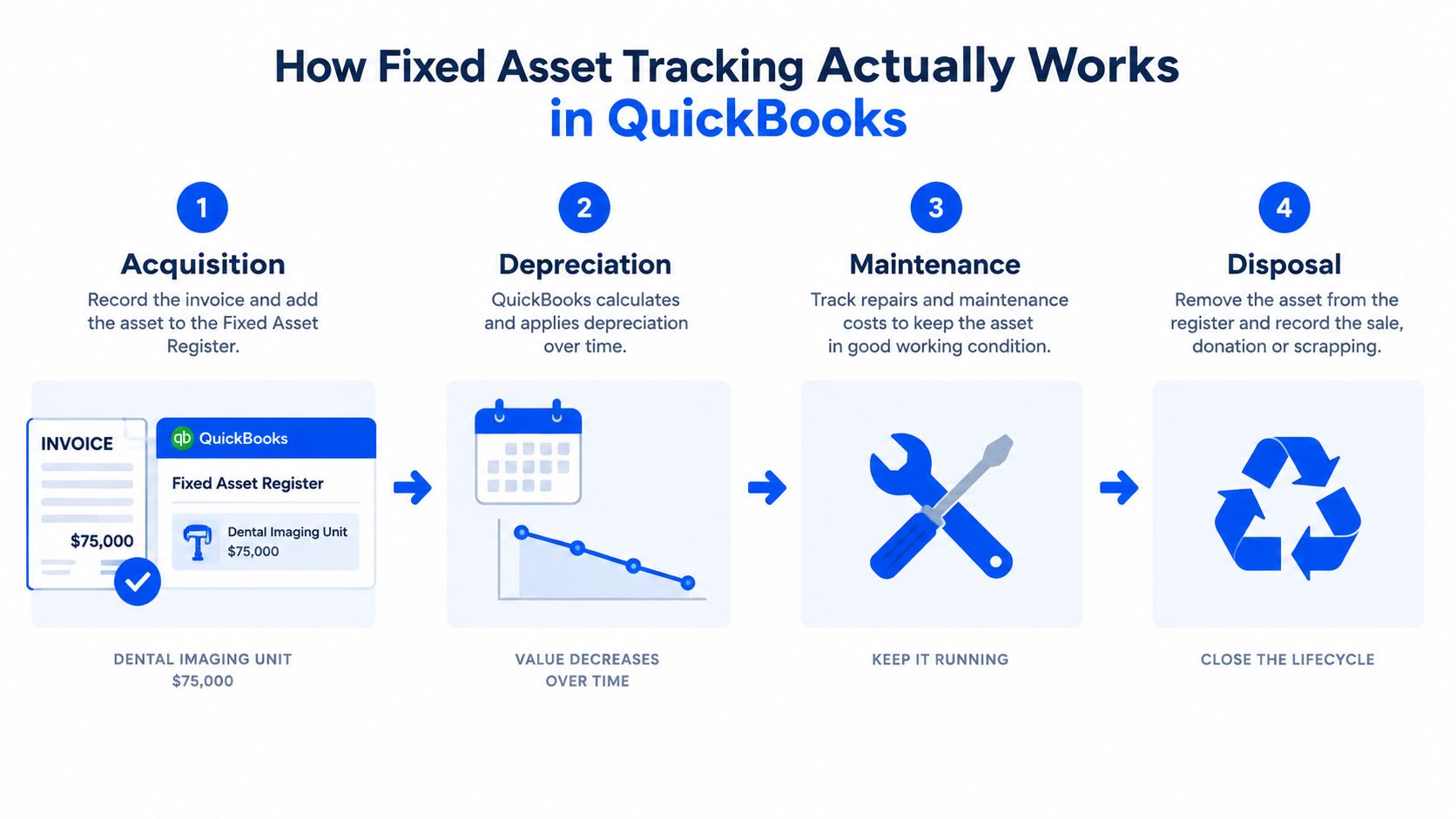
Acquisition and setup
The controller should record the original cost, purchase date, vendor, asset category, and date placed in service. In a desktop workflow, the Fixed Asset Item List stores the asset record. QuickBooks Online Advanced provides the Fixed Asset List and related depreciation reports, giving the team a dedicated record for the item.
Classification at purchase determines whether the ledger can support later reporting. Posting the imaging unit directly to an expense account understates equipment on the balance sheet and leaves depreciation without a dependable source record. Recording only a financed down payment produces the same control problem, because the asset cost and related liability do not reflect the full transaction. For policy support, the IRS notes in its tangible property guidance that amounts paid to acquire, produce, or improve tangible property generally must be capitalized under Section 263(a). See the IRS Tangible Property Audit Technique Guide.
Depreciation and ongoing changes
Depreciation setup requires a useful life, method, convention, depreciation expense account, and accumulated depreciation account. QuickBooks Desktop's Fixed Asset Manager stores asset information and calculates depreciation based on IRS standards. QuickBooks Online generally requires manual journal entries. Intuit's instructions for depreciating assets in QuickBooks Online explain the required account structure and journal-entry process. For tax context, the IRS states that MACRS applies to most tangible property placed in service after 1986. See IRS Publication 946.
Additions and improvements increase the recorded cost when they meet the organization's capitalization policy. Transfers require updated class or location coding, along with a review of ownership and reporting dimensions. Maintenance costs normally remain separate from the asset cost unless the accounting policy requires capitalization. For book accounting, ASC 360 treats depreciation as a systematic allocation of cost over useful life rather than a valuation adjustment. See this ASC 360 summary.
These steps expose the decision. If QuickBooks cannot preserve the asset record from acquisition through disposal without repeated manual work, buying another add-on may only extend a weak system of record.
Disposal and reconciliation
When the dental group retires or sells the unit, the team removes the original cost and accumulated depreciation, records any proceeds, and recognizes the resulting gain or loss. QuickBooks Online disposal workflows still require manual journal entries, so the controller must validate the date, accounts, and supporting documentation.
At close, compare the asset register with the fixed asset and accumulated depreciation accounts in the general ledger. At year-end, prepare a roll-forward covering beginning balances, additions, depreciation, disposals, and ending balances. That roll-forward provides the control evidence an auditor or CPA will review. If the process depends on spreadsheets and repeated corrections, assess migration criteria before selecting a QuickBooks extension. Basis tracking also matters here, because the IRS requires adjusted basis to reflect depreciation allowed or allowable. See IRS Publication 551.
What Each QuickBooks Edition Really Handles
QuickBooks isn't one fixed asset product. It's a collection of editions with materially different workflows. Intuit states that fixed asset list management is available only in QuickBooks Online Advanced, while lower Online plans rely on other reports. Desktop users may have access to the separate Fixed Asset Manager, depending on their edition. Intuit's fixed asset list explanation makes the subscription boundary clear.
| Capability | QBO Simple Start / Essentials | QBO Advanced | QuickBooks Desktop + Fixed Asset Manager | Manual Journal Entries |
|---|---|---|---|---|
| Asset register | Workarounds using general reports | Dedicated Fixed Asset List | Fixed Asset Manager | Spreadsheet or separate register |
| Depreciation | Typically calculated outside the core workflow and posted manually | Fixed asset workflow with detailed reporting, while entries still require control | Depreciation can be calculated in the desktop environment using FAM | Controller calculates and posts entries |
| Locations and segments | Uses available classes and locations | More comprehensive dimensional reporting | Desktop lists and reporting depend on edition and setup | Manual coding and reconciliation |
| Multi-entity handling | Separate company files and parallel reporting | Still requires attention to company-file structure | Separate files and desktop workflows | Separate registers and journals |
| Audit trail depth | Limited by product and configuration | More structured asset reporting, but not a substitute for ERP controls | FAM supports asset records and reports | Depends on workpapers and journal documentation |
| Reporting granularity | Generic reports and account balances | Fixed Asset List and Fixed Asset Depreciation Detail report | Fixed Asset Manager reports | Custom spreadsheets |
The manual path is the least expensive to start and the most expensive to control. The Desktop Fixed Asset Manager is more capable than a recurring journal-entry process, but it remains tied to a desktop environment. QuickBooks Online Advanced is the strongest native Online route, yet it doesn't erase the need for disciplined journal entries, approvals, and reconciliations.
If the general ledger is already under strain, compare the required asset controls with the broader capabilities described for a Sage Intacct general ledger. The decision shouldn't be based on whether QuickBooks can record an asset. It should be based on whether it can support the complete close and audit process.
Where QuickBooks Quietly Breaks Down for Growing Teams
Feature comparisons ask whether a system can create an asset record. Finance leaders should ask whether it can support the close, audit response, and consolidation without workarounds.
First, QuickBooks Online doesn't automatically depreciate fixed assets by default. Finance teams typically post manual journal entries to depreciation expense and accumulated depreciation accounts. That creates a control burden. Inconsistent timing, classification, or subaccount use can make depreciation expense and net book value diverge from the underlying register.
Second, QuickBooks Online Plus has a combined cap of 40 classes and locations, while Advanced has no cap. Intuit's usage-limit documentation states that only active or invited users, accounts, classes, locations, and custom fields count toward those limits. A growing company can therefore face a dimensional-tracking constraint before the accounting team recognizes that available capacity is being consumed.
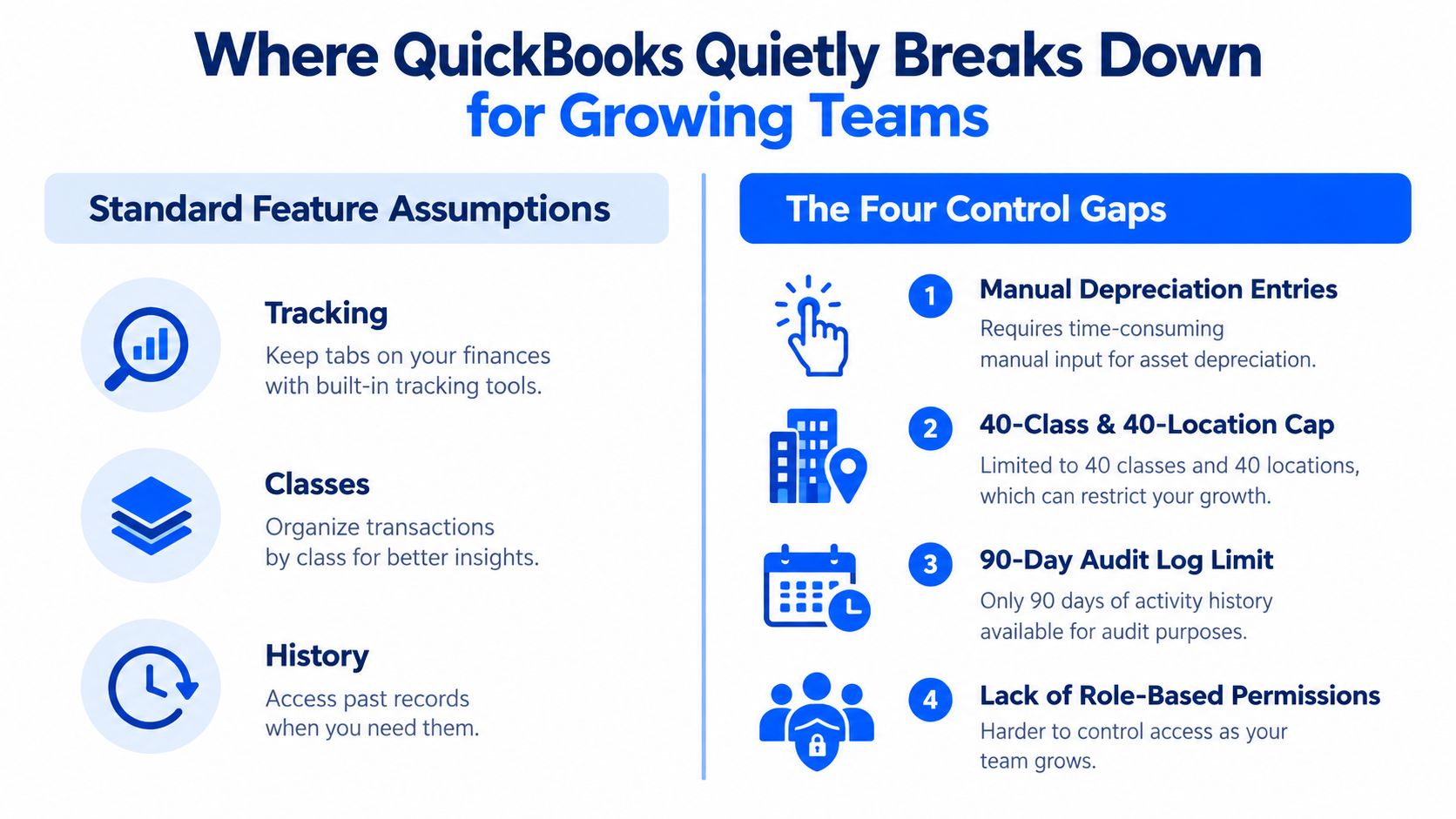
The audit and consolidation gaps
Historical visibility creates another control problem. Published analysis of QuickBooks Online multi-entity use says the platform retains audit logs for two years, after which older records become archived and inaccessible. The multi-entity accounting analysis identifies this limitation as a compliance and auditor-response risk when historical intercompany support is required.
Consolidation creates a separate burden. QuickBooks-based multi-entity workflows often rely on separate company files, without a true consolidated general ledger or automation for intercompany eliminations, minority interests, and foreign-currency translation. The published QuickBooks limitations guide describes consolidated reporting as parallel reporting across separate files rather than native consolidation. Similar finance-team concerns are discussed in this review of QuickBooks multi-entity consolidation limits.
Controllers then spend more time validating journals, rebuilding history, and explaining why consolidated balances fail to expose entity-level risk. QuickBooks Enterprise has also been described as providing no audit trail for consolidation activities, requiring separate documentation for elimination journals, workpapers, and reconciliations. The consolidation reporting analysis details that control gap.
The decision is not which add-on records assets. It is whether QuickBooks remains the right system of record for the asset base, entities, and close process. Repeated manual schedules, weak historical access, and spreadsheet-dependent consolidation are migration criteria, not minor process inconveniences.
Three Real Paths Forward and How to Choose
Finance leaders usually have three viable paths. The mistake is treating them as interchangeable. Each path solves a different level of operational complexity.
| Path | Best Fit | Trigger to Escalate |
|---|---|---|
| Stay in QuickBooks and tighten process | A smaller asset base, simple depreciation, limited locations, and one company file | Repeated reconciliation errors, heavier audit requests, or manual schedules becoming routine |
| Add a third-party fixed-asset module | A stable QuickBooks environment that needs stronger asset lifecycle control without replacing the general ledger | Class or location constraints, multi-entity reporting, integration friction, or a broader need for dimensional control |
| Migrate to a cloud ERP | Finance teams needing integrated assets, entities, approvals, dimensions, and close reporting | A second entity, acquisition activity, recurring consolidation work, or a close that depends on spreadsheets |
Path one, disciplined QuickBooks
Staying put can work when the organization has simple asset categories and a finance team that can enforce monthly controls. Create a formal capitalization policy, assign ownership for additions and disposals, lock the depreciation calendar, and reconcile the asset register to the general ledger every close.
This path fails when the controller is rebuilding depreciation schedules in Excel each month. It also fails when the same person enters, approves, and reconciles fixed asset journals without an independent review. A process cannot compensate indefinitely for a system that lacks the required control structure.
Path two, a dedicated module
A third-party module can add asset-level records, depreciation schedules, disposal workflows, and reporting while the general ledger remains in QuickBooks. That can be a sensible bridge when the accounting structure is sound and the business isn't yet asking for native multi-entity consolidation.
The integration deserves more scrutiny than the demo. Confirm how acquisitions flow into the asset register, how depreciation entries reach QuickBooks, how disposals remove cost and accumulated depreciation, and how users handle corrections. A technically attractive module that creates another disconnected register moves the reconciliation problem.
Path three, a cloud ERP
A cloud ERP becomes the stronger choice when fixed assets are only one symptom of a broader finance problem. Multiple entities, shared locations, approval layers, project dimensions, intercompany activity, and audit support all belong in the same operating model.
The migration itself should follow a controlled sequence:
- Export and cleanse the register. Validate acquisition dates, original cost, accumulated depreciation, useful lives, locations, and disposal status against the general ledger.
- Redesign the chart of accounts. Separate asset cost, accumulated depreciation, depreciation expense, disposal accounts, and gain or loss accounts where needed.
- Configure depreciation. Map methods, useful lives, conventions, and posting accounts before importing production balances.
- Set role-based approvals. Define who can add assets, change classifications, post depreciation, approve disposals, and reconcile balances.
- Run a parallel close. Operate the new workflow alongside QuickBooks for one period, compare entries and reports, and resolve differences before cutover.
The most common migration errors are predictable. Teams import net book value instead of original cost and accumulated depreciation, omit entity or location coding, and underestimate the cleanup required in bank and credit-card reconciliations. The first close after migration is a rehearsal, not a finish line. A practical QuickBooks data migration approach should treat data quality and close validation as finance work, not merely technical conversion.
Decision Lens by Industry and Growth Stage
The same QuickBooks limit feels different in each industry. A healthcare group cares about equipment, leasehold improvements, multiple operating entities, and reliable depreciation by site. A nonprofit must often connect capitalized assets with restricted funds, grants, and campaign reporting. A DSO needs location and entity visibility as practices expand. A professional services firm may need project, department, and client-related segmentation for capitalized software or reimbursable assets.
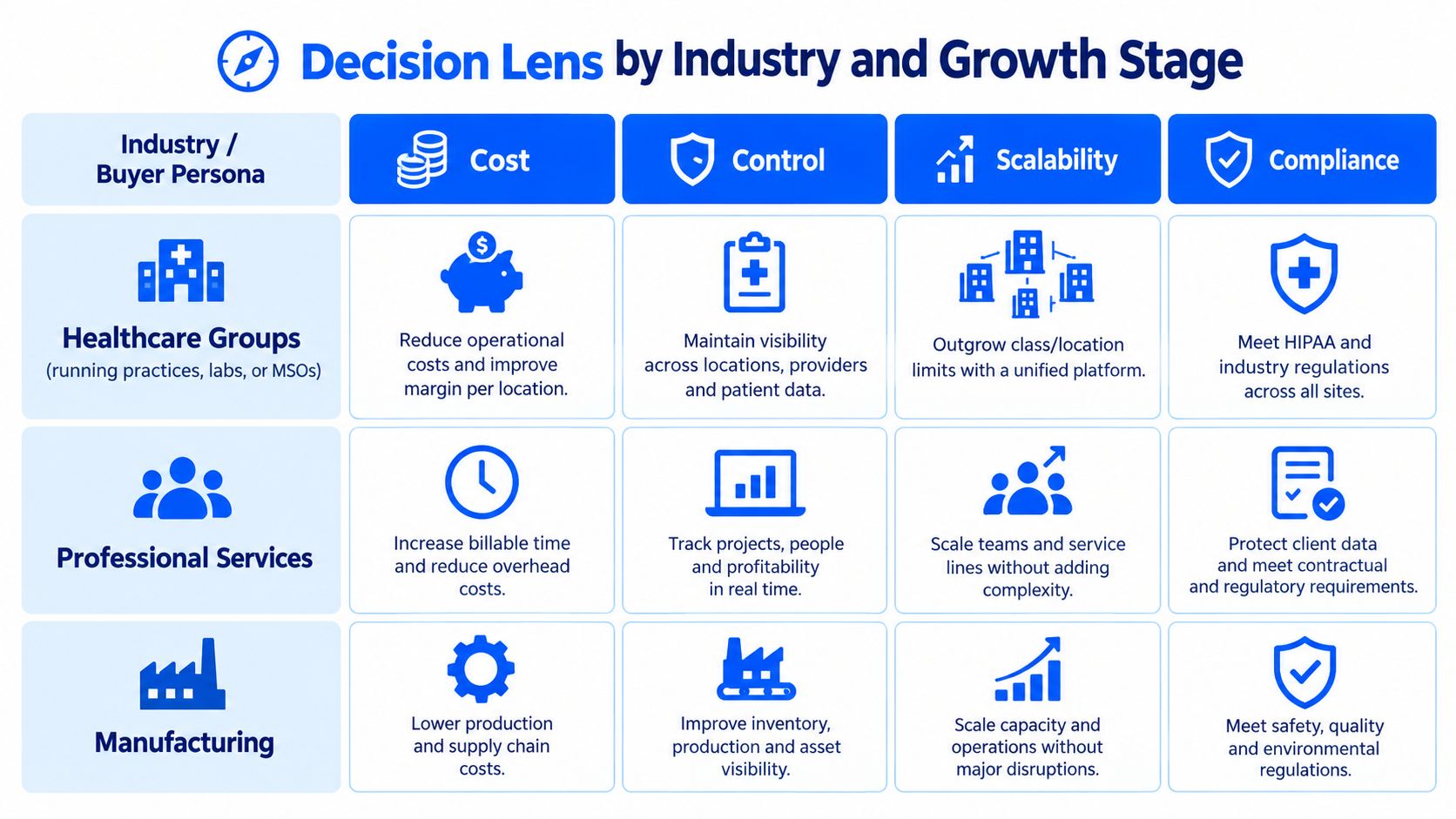
Four signals that matter
Use four lenses rather than a generic software checklist:
- Cost: How much close time does the team spend calculating, correcting, and explaining asset activity?
- Control: Can someone independent review additions, depreciation, transfers, and disposals with a dependable history?
- Scalability: Can the system support more entities, sites, departments, and reporting dimensions without forcing work into spreadsheets?
- Compliance: Can the team produce a roll-forward, supporting schedules, and historical evidence when an auditor or board asks?
For healthcare and DSO leaders, recurring intercompany activity and equipment expansion are stronger warning signs than asset count alone. For nonprofits, the collision between grant restrictions, fund dimensions, and capitalization policy deserves early attention. Professional services leaders should focus on whether project reporting and capitalized costs require a level of segmentation QuickBooks cannot maintain cleanly.
A useful growth-stage rule is to review the system when the company has more than 250 active assets, two or more legal entities, a controller who isn't entering fixed-asset journals personally, or audit cycles taking longer than 30 days. Those thresholds are decision signals, not universal accounting rules. If two or more apply, evaluate the system of record before purchasing another narrow tool.
For a wider platform decision, compare the asset question with the broader Sage Intacct versus NetSuite discussion. The right choice depends on the operating model, not on a fixed asset feature in isolation.
When Sage Intacct and the Right Partner Change the Picture
The strongest argument for Sage Intacct isn't that QuickBooks can't record a fixed asset. It's that growing finance teams need the asset lifecycle connected to the financial system they already use for close, reporting, approvals, and entity management.
With Sage Intacct, the asset subledger can live inside the broader general-ledger environment. Depreciation can post through the configured financial workflow instead of leaving the controller to reconcile a separate register and recurring manual journals. Dimensions such as class, location, department, and project provide a more scalable way to analyze activity than relying on a segmented structure that may hit QuickBooks limits.
The multi-entity issue also changes shape. Native entity-level reporting, intercompany processes, and consolidation workflows reduce the dependence on parallel company files and spreadsheet eliminations. Role-based security and audit-oriented history give finance leaders a stronger control foundation than an informal collection of workpapers.
That doesn't make implementation automatic. The migration still depends on clean source data, a deliberate chart of accounts, correctly configured depreciation methods, approval roles, and a parallel close. The implementation partner matters because software alone can't decide whether a disposed asset should be removed, whether accumulated depreciation was migrated correctly, or how a healthcare, nonprofit, DSO, or professional services organization should structure its dimensions.
Lucentive is a Sage Intacct National Premier Partner with experience serving mid-market, healthcare, and nonprofit organizations. Its role is most valuable before the purchase decision, when the finance team needs to map the current QuickBooks asset base, entity structure, reporting requirements, and close pain to a realistic migration plan.
The decision remains simple. Stay in QuickBooks if disciplined manual controls are still proportionate to the business. Add a fixed asset module if the general ledger is sound but asset lifecycle management is the isolated gap. Move to a cloud ERP such as Sage Intacct when asset complexity signals a wider need for integrated core financials, multi-entity control, dimensions, and audit-ready reporting. The Sage Intacct core financials overview provides the broader context for that choice.
Summary
QuickBooks can support fixed asset tracking, but capability varies sharply by edition. QuickBooks Online Advanced includes dedicated asset-list reporting, while lower Online tiers rely more heavily on workarounds and manual journals. Desktop users may have the Fixed Asset Manager. Growing teams should assess depreciation controls, class and location limits, audit history, multi-entity reporting, asset volume, and close pressure. The practical paths are tighter QuickBooks controls, a third-party module, or migration to a cloud ERP such as Sage Intacct.
Frequently Asked Questions
Can QuickBooks Online Advanced operate as a fixed asset register
Yes, QuickBooks Online Advanced includes a Fixed Asset List and a Fixed Asset Depreciation Detail report, so it can provide a more structured asset workflow than lower Online tiers. It doesn't remove the need for accounting governance. Finance teams still need to validate original cost, depreciation accounts, accumulated depreciation, disposals, approvals, and the journal entries that connect asset activity to the general ledger.
How does Desktop Fixed Asset Manager differ from QuickBooks Online tools
QuickBooks Desktop's Fixed Asset Manager is a separate desktop workflow that stores asset information, calculates depreciation based on IRS standards, and generates reports within the QuickBooks environment. QuickBooks Online has a different workflow, with Advanced providing dedicated fixed asset list reporting. Online depreciation generally requires manual journal entries, so Controllers must manage posting cadence and reconciliation carefully.
What signals show that a company has outgrown QuickBooks
The strongest signals are recurring manual depreciation work, pressure on classes and locations, a need for deeper audit history, more complex disposals, and multi-entity consolidation requirements. Other indicators include more than 250 active assets, two or more legal entities, a controller who no longer enters every fixed-asset journal, or audit cycles taking longer than 30 days. These conditions point to a system-of-record review.
What does a migration-led fixed asset project include
A controlled project exports and cleanses the current register, reconciles original cost and accumulated depreciation, redesigns the chart of accounts, configures depreciation methods and useful lives, establishes role-based approvals, and runs a parallel close before cutover. The team should also test entity and location coding and resolve bank and credit-card reconciliation cleanup. The first post-migration close validates the design and exposes remaining issues.
Schedule a 30-minute working session with Lucentive to map your QuickBooks asset register, entity structure, reporting needs, and close risks against Sage Intacct. Visit Lucentive to request a Sage Intacct discussion or demonstration, with no-pressure guidance on whether you should tighten QuickBooks, add a module, or migrate.