You've sent a clean, professional-looking invoice on the last day of the month, and ten days later the customer's accounts payable team sends it back. The bill-to entity is wrong, there's no purchase order number, and the due date doesn't match the contract. Nothing here is a design problem. It's a cash problem, because the clock restarts, the receivable ages, and your team now has an open item to explain at close.
To generate invoice records that get paid, judge each one by a simple test. Will it pass approval on the first attempt, and will it post cleanly in your ledger?
Table of Contents
- What a Generated Invoice Must Contain
- Calculating a Consulting Invoice With Tax and Due Date
- How to Generate an Invoice Step by Step
- Payment Terms and the Cost of Late Cash
- Record Each Invoice and Choose the Right System
- Summary
- Frequently Asked Questions
What a Generated Invoice Must Contain
An invoice does three jobs at once. It's a payment request to the customer, a tax record for the authority, and an audit trail for your own close. A field that satisfies only one of those jobs will fail another one later.
Say your invoice names the trading name your sales team uses, not the customer's legal entity. The customer's AP team can't match it to their vendor record, so it sits unapproved. Your controller then chases a payment that was never going to move.
The minimum data model
Start with a clear baseline. UK government guidance on what invoices must include specifies a unique invoice identification number, the supplier's legal name, address, and contact information, the customer's name and address, a clear description of the goods or services, the supply date, the invoice date, line-item amounts, applicable VAT, and the total due. Limited companies must use their full registered name, and VAT-registered businesses must add further required information to a VAT invoice.
That list is a floor, not a complete pre-send check. For VAT invoices, check the additional details in HMRC's VAT invoice guidance. In practice you'll also need the customer's PO or contract reference, the correct billing entity, a project, fund, or cost-center code, and payment terms with a calculated due date. If you're billing project work, the coding that links an invoice to an engagement is what lets project accounting software show margin while the work is still running.
Pre-send rule: Treat this checklist as a control, not a formatting exercise. If a field is blank, the invoice doesn't leave.
| Field | What a correct entry looks like | Why it matters |
|---|---|---|
| Unique invoice number | Sequential, never reused | Enables duplicate detection and credit note references |
| Supplier details | Full registered legal name, address, contact | Lets the customer confirm who they are paying |
| Customer details | Legal entity name and bill-to address | Routes the invoice to the right entity and AP team |
| Invoice date | Date of issue | Starts the payment clock under your terms |
| Supply or service date | Date goods or services were delivered | Sets the tax period and revenue timing |
| Line descriptions | Item or service, quantity, unit price, line amount | Quantity or rate errors here cause disputes |
| Tax | Rate and amount per taxable line, tax ID where required | Required for VAT or sales tax compliance |
| Total due | Subtotal plus tax, matching the sum of lines | Confirms the amount the customer must pay |
| Payment terms and due date | For example Net 30 with a calculated date | Defines when cash is expected |
| Payment instructions | Bank details or payment link | Prevents payments sent to the wrong account |
| PO or contract reference | Customer PO number or agreement ID | Allows accounts payable to match the invoice |
Calculating a Consulting Invoice With Tax and Due Date
Work one invoice by hand before you trust any template. A consulting engagement bills 80 hours at $125, so the services line is $10,000.00. There's also a $500.00 reimbursable travel pass-through billed at cost. In this example that pass-through is non-taxable, so it sits outside the tax base rather than inflating it.
Apply an illustrative 8% sales tax to the $10,000.00 taxable amount and you get $800.00. The subtotal is $10,500.00, tax is $800.00, and the total due is $11,300.00. Date the invoice March 1, 2026 with Net 30 terms and the due date is March 31, 2026.
| Line | Calculation |
|---|---|
| Consulting services | 80 hours x $125 = $10,000.00 |
| Travel pass-through | $500.00 at cost, non-taxable in this example |
| Subtotal | $10,000.00 + $500.00 = $10,500.00 |
| Sales tax | 8% x $10,000.00 taxable services = $800.00 |
| Total due | $10,500.00 + $800.00 = $11,300.00 |
| Due date | Invoice dated March 1, 2026 plus Net 30 = March 31, 2026 |
| Early-payment variant | 2% discount on $10,000.00 = $9,800.00 taxable base before tax |
Two details that break reconciliation
Tax rules differ by jurisdiction and by what you're selling, so replace that 8% rate with the rate your advisor confirms for your location and service type. Don't let a template default make that decision for you.
Rounding needs a rule set in advance. Decide whether you calculate tax per line or per invoice, apply it consistently, and state which one you use. A one-cent gap between line totals and the header total is a small break that still stops a customer's automated matching and clutters your own reconciliation.
What changes when a discount applies
A 2% early-payment discount on the services line reduces the taxable base to $9,800.00 before you calculate tax. Show that discount on the invoice itself. If it's negotiated later by email, your ledger, the customer's AP record, and the cash you receive will disagree, which is exactly the kind of variance clear project accounting rules are meant to prevent.
For the first few billing cycles, recompute each invoice by hand and compare it with what your system produces. When the two agree every time, you can trust the run.
How to Generate an Invoice Step by Step
Follow this order every time. Skipping ahead is how a draft with bad math reaches a customer.
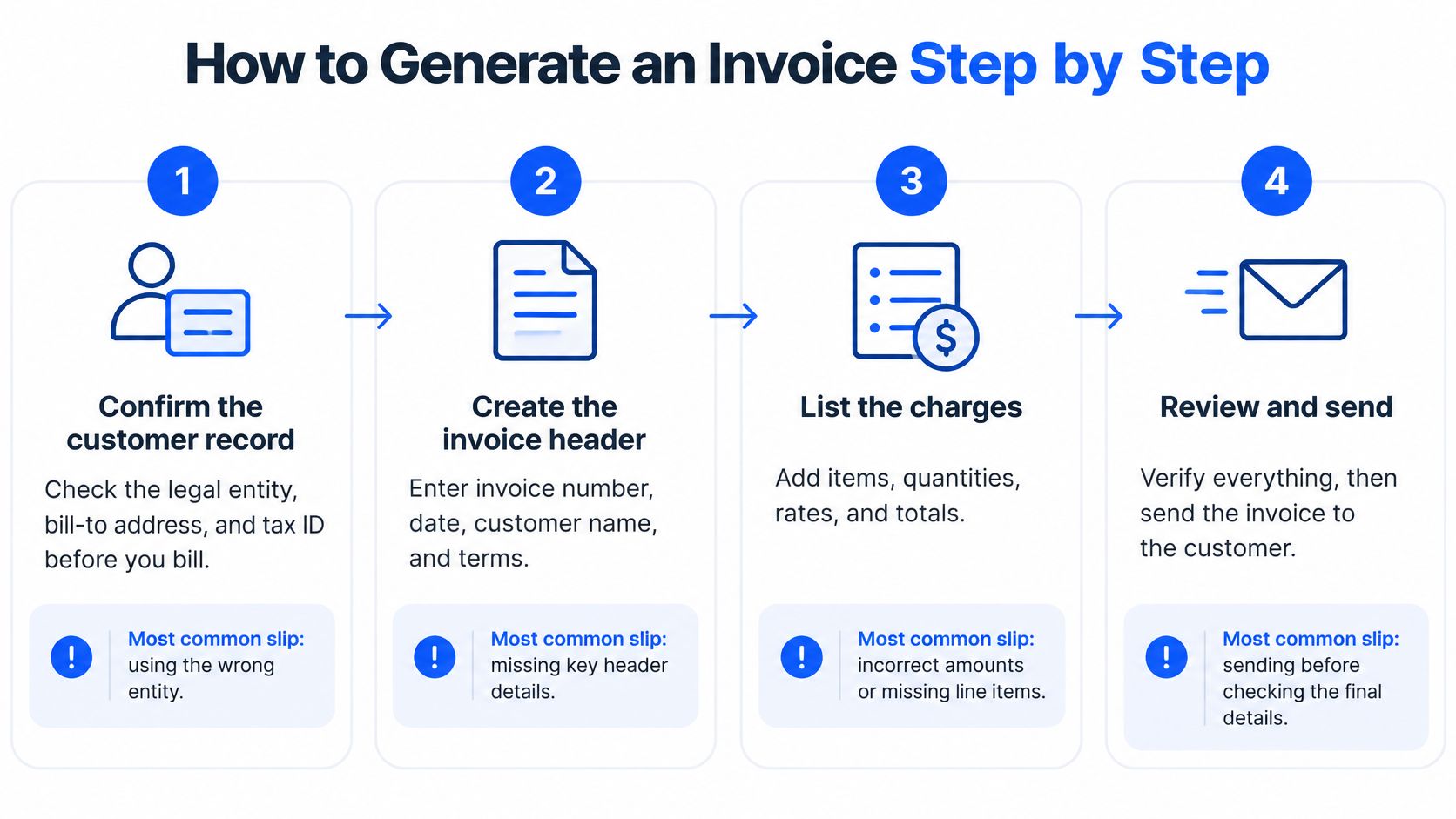
The seven steps
Confirm the customer record. Check the legal entity, bill-to address, and tax ID before you bill, because a wrong entity is the fastest route to a rejected invoice. Don't copy details from the last invoice if the customer has restructured or moved billing to a shared service center.
Pull the approved basis. Use the signed contract, purchase order, or order form that states quantities, rates, and terms, because that's the record your customer will match against. Never rebuild a rate from memory or from a proposal that was later amended.
Assign the next invoice number. Take it from one controlled sequence so numbers are never reused, even after a void. A reused number defeats duplicate detection and makes credit note references ambiguous.
Calculate each line, then reconcile. Work out quantity, rate, discount, and tax per line, then reconcile the line totals to the header total before anything is sent. If they don't agree, stop here.
Add terms and routing details. Enter payment terms, the calculated due date, payment instructions, and the PO or contract reference, because AP can't approve what it can't match or schedule. Name the correct approver where the customer requires one.
Route the draft for review. Send it to the named approver before it goes out. We treat internal controls as mostly a design exercise about people rather than software, so decide who approves an invoice, above what threshold a second approver is needed, who can post to a closed period, and who can create a vendor before you configure anything. A modern accounts receivable workflow can enforce those decisions, but it can't make them.
Send it through the accepted channel and log it. Use the channel the customer processes, whether that's a portal, a structured feed, or email, and log the send date so the due date and any follow-up remain traceable. If you need a disciplined sequence after that date passes, these tips for following up on invoices from Suby cover the client-facing side of the chase.
A draft that fails the reconciliation in step 4 should never reach step 7. Fix the source data, don't override the total.
Payment Terms and the Cost of Late Cash
The most expensive term error is a due date that doesn't match the contract. Your team starts chasing on day 31, the customer believes they have until day 45, and nobody owns the disagreement. Meanwhile the receivable ages and your forecast carries cash that isn't coming when you said it would.
Teams often assume terms are a commercial preference they can set freely. In the UK they aren't. The UK government guide to the recast Late Payment Directive states that for UK business-to-business transactions, payment terms generally should not exceed 60 days unless the parties expressly agree otherwise and the arrangement is not unfair to the creditor.
What late payment lets you charge
When a commercial customer pays late, that same guide sets statutory interest at 8% plus the Bank of England base rate. The Small Business Commissioner's interest calculator guidance explains which base rate applies when calculating it. There's a condition worth checking before you rely on it. Statutory interest can't be claimed if the contract already specifies a different interest rate. Where a business does add statutory interest, it may issue a new invoice for the interest amount.
Those mechanics make payment terms, contractual interest rules, due dates, and follow-up invoices controls rather than optional text at the bottom of a document. If your contract sets one rate and your invoice template prints another, you've created a dispute instead of a remedy.
Put the rule in two places
Write the rate, the due-date rule, and the payment instructions into the contract and into the invoice template. Keep the due-date formula in the template so every invoice shows the same rule and terms are never reconstructed from a later email thread. That consistency also makes your rolling cash flow forecast honest, because expected receipt dates come from the same rule your customers see.
For practical habits that shorten the gap between sending and receiving, it's worth reading how to get paid sooner with Accountant She alongside your own terms review.
These UK rules apply to UK business-to-business contracts. If you're billing customers in other jurisdictions, have their terms checked against local requirements rather than assuming one template travels.
Record Each Invoice and Choose the Right System
An invoice earns its keep after it's sent, when it posts cleanly and survives the customer's approval process. Post it to the ledger with the same invoice number, customer, entity, and dimension codes shown on the document, then track it through partial payment, full payment, credit note, or write-off. That status history is what your aging trial balance reports, and a report built on mismatched codes will age the wrong invoices against the wrong projects. If you're VAT-registered in the UK, HMRC's VAT recordkeeping guidance says to keep copies of invoices you issue and receive, generally for at least six years.
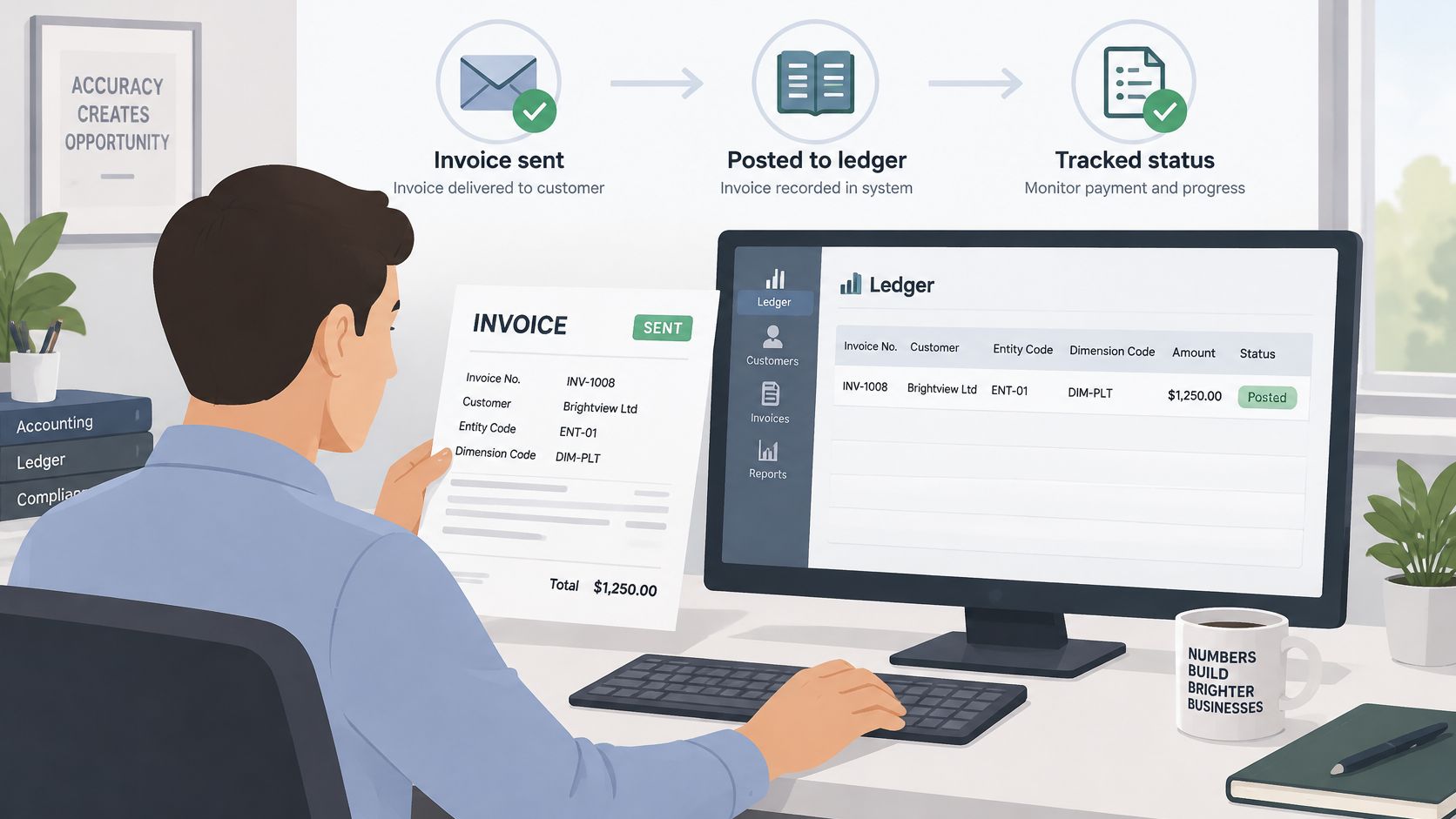
Format is a compliance decision
Three different things travel under the label electronic invoicing: a PDF emailed to the customer, structured EDI, and e-invoicing wired into a tax authority. A PDF is a picture of an invoice. Structured EDI is machine-readable data the customer's system validates field by field, and tax-authority e-invoicing can mean the invoice is cleared by a government platform before your customer ever sees it. In Hungary, OECD reporting on electronic invoicing found 1,960 taxpayers using EDI invoices, just 0.3% of taxpayers, against nearly 110,000 using non-EDI electronic invoicing. The dominant format in your customer's jurisdiction may not be the one your template produces, so confirm which applies before you automate sending.
One system of record
An accounting or ERP system earns its place by controlling numbering, tax rules, approval routing, and posting in one place. Name one system of record and make other tools receive records rather than originate them. The ledger is often the right place, because three systems each minting their own invoice or project ID leaves you stitching reports together by hand. If you're comparing tools at the invoicing layer, Truespeak's 2026 invoicing software picks are a useful starting point, though fit with your entities and billing methods is the harder question.
Software supplies the functions. Implementation decides whether your entities, billing methods, and approval thresholds are configured correctly on the first run. The usual signals you've outgrown basic tools are multiple entities, mixed billing methods, or project margin that only exists in a spreadsheet.
That's why choosing the right system is a separate decision from buying a product. If those signals sound familiar, schedule a 30-minute working session with the Lucentive team to review your entities, billing methods, and approval controls against your options.
Summary
A generated invoice is a payment request that also serves as a tax and audit record. Check it against the required fields, including the UK minimum plus a PO reference, billing entity, dimension codes, and due date. Follow the seven steps in order, from confirming the customer to sending and logging. The worked example produced $11,300.00 due March 31, 2026 under Net 30. Watch for the wrong entity, a missing PO, a mismatched due date, and reused numbers. Post every invoice, track its status, and confirm the delivery format before automating.
Frequently Asked Questions
What fields does an invoice have to include
Use the UK minimum as your baseline: a unique invoice number, supplier and customer legal names and addresses, a clear description of goods or services, supply and invoice dates, line amounts, applicable VAT, and the total due. Limited companies use their full registered name, and VAT-registered businesses add further required information. Then add what your customer needs to approve it, especially a PO or contract reference, payment terms with a calculated due date, and payment instructions.
An invoice with every statutory field can still bounce. The test is whether the customer's AP team can match and approve it without emailing you for a missing reference.
What should I do after I find a mistake on a sent invoice
Leave the original record in place. Issue a credit note that references the original invoice number, then generate a corrected invoice with a new number from your controlled sequence. That preserves the audit trail, keeps duplicate detection working, and gives the customer's AP team a clean document to match. Reconcile the corrected line totals to the header total before sending, and log the new send date so the revised due date and any follow-up remain traceable.
Is emailing a PDF enough for electronic invoicing
Sometimes. A PDF emailed to a customer is one format among several. Structured EDI and e-invoicing connected to a tax authority carry different validation and compliance requirements, and adoption of each method differs sharply by country. Confirm which format your customer and jurisdiction require before you automate, because a process built around emailed attachments can need rebuilding later. Whatever the format, keep the same invoice number, customer, entity, and coding in your ledger record.
What payment terms are allowed for UK business invoices
For UK business-to-business transactions, terms generally shouldn't exceed 60 days unless both parties expressly agree otherwise and the arrangement isn't unfair to the creditor. If a commercial customer pays late, statutory interest is 8% plus the Bank of England base rate, but you can't claim it where the contract already sets a different rate. Where statutory interest is added, you may issue a new invoice for that amount. Put the rate and due-date rule in both contract and template.
Who should approve an invoice before it is sent
Name a specific approver, and set the amount above which a second approver is required. Decide at the same time who can post to a closed period and who can create a vendor. These are control design decisions about people rather than software settings, so settle them before configuration. Your system can then enforce the routing and thresholds you've chosen. Until those decisions exist, approval depends on whoever happens to see the draft, which is routing by accident rather than a control.
If returned invoices, spreadsheet margin, or multi-entity billing are slowing your cash and your close, those are the usual signs a firm has outgrown its basic tools. As a Sage Intacct Value Added Reseller and Premier Implementation Partner, Lucentive implements Sage Intacct for organisations that have outgrown single-entity accounting, and can keep a billing tool that already works while connecting it to send invoices and contract data to the ledger where revenue is recognized. Visit Lucentive to talk through your entities, billing methods, and approval controls with our team.