Your board asks for group margin by site. Your Controller can't answer from the ledger. She answers after three exports, a rebuilt workbook, and a late check that the totals still tie. That's the moment to judge QuickBooks Online.
Table of Contents
- The Close That Still Lives in Spreadsheets
- Where QuickBooks Online Earns Its Place
- What One Company File Actually Covers
- Separate Files and the Group Close
- Classes Locations Funds and Projects
- Signs the Current Books Are the Bottleneck
- Decide Whether the Books Still Fit
- Summary
- Frequently Asked Questions
The Close That Still Lives in Spreadsheets
Say a three-site group runs each site well enough day to day. Invoices go out, bills get paid, bank feeds clear. Month end is different. The Controller exports three company files, rebuilds the consolidation workbook, and only then can she explain group margin. If a director changes the question, she starts the tie-out again.
That split, clean daily books inside one file and group answers outside it, is the test. If you already recognize it, moving off QuickBooks is a practical next step to scope before you pick any replacement. Don't decide from frustration alone. Decide from where your close work lives.

QuickBooks Online is Intuit's subscription accounting product, organized around one company file. That file holds customers, vendors, invoices, bills, bank feeds, a chart of accounts, and standard financial reports. It's a complete book for the company that's open, not a group ledger for every company you own.
Scale Is Not the Decision
Intuit's scale is real, and it shouldn't sway you either way. In Intuit's filing for fiscal year 2025, ended July 31, 2025, QuickBooks Online Accounting revenue was $4.120 billion, up $741 million or 22% from $3.379 billion in fiscal 2024, after 19% growth the year before. Intuit attributed the rise to customer growth, higher effective prices, and a shift toward higher-value offerings, and the figure covers QuickBooks Online Accounting only.
A disciplined checklist still helps any team close your books with Smart Receipts, and better automation of financial reporting can remove repetitive assembly. Neither changes the structural question. If board totals live in a workbook, your reporting risk lives there too.
Where QuickBooks Online Earns Its Place
I'll defend QuickBooks Online in a budget meeting when one legal entity is the reporting unit. The books, bank feeds, invoices, and bills sit in one familiar file. A competent bookkeeper can work productively in the first week, and a Controller doesn't need a separate reporting tool to produce a standard profit and loss or balance sheet for that company. That's not a small advantage. Familiarity lowers training cost, speeds hiring, and keeps daily accounting moving.
The subscription model also keeps the starting footprint small. You don't buy a multi-entity structure you don't yet need, and you don't ask a lean team to administer controls designed for a group. For a single-entity services firm, clinic, retailer, or nonprofit with straightforward reporting, that restraint is financially sensible. Paying for complexity early doesn't make the books better.
Useful Cuts Inside One File
Classes let you segment income and expenses, while locations give that single file another useful management cut. You can report by department, program, service line, or site without opening another set of books. Projects let you follow client income and costs inside the same ledger. The Advanced edition removes the combined cap on those dimensions, so a growing single entity has room to refine its coding before it needs a new system.
Connected apps add to the case. Invoices, payments, and bank activity can feed the file through Intuit's API, so staff don't key the same transaction twice. When volume is steady and integrations sync changes incrementally, the file stays current without turning month end into a data entry exercise.
Keep the product while its strengths describe your whole company. Reassess when its limits describe your monthly close.
The limits are specific, and you can test each one. Legal entities sit in separate company files. Consolidation is assembled outside the product. The Plus edition caps combined classes and locations. Classes approximate fund accounting rather than replace it. Connections run under per-company limits.
None of those facts makes the product weak. They make it bounded. Your job is to measure whether your organization still fits inside those bounds, or whether your team now spends its best hours working around them every month.
What One Company File Actually Covers
Start with the table. Mark each row already true, tolerable with a workbook, or already a monthly fire drill. That mark matters more than any vendor claim.
| Finance job | Inside one company | Where it leaves the ledger |
|---|---|---|
| Day-to-day books | Invoices, bills, bank feeds, and a chart of accounts for that company | Stays contained while one legal entity is the reporting unit |
| Standard statements | Profit and loss and balance sheet for the open company | Group statements are not a native report across companies |
| Connected apps | Invoices, payments, and customers synced into that company file | Full-history pulls and bulk imports run into Intuit's per-company connection limits |
| Management cuts | Classes and locations on transactions inside that file | A reporting matrix that no longer matches one chart and one file |
| Outside reporting packages | Exports of the company report | Board, lender, or funder totals the company report does not show |
Read the first row plainly. One QuickBooks Online company records customers and vendors, creates invoices and bills, pulls bank activity through feeds, and holds the chart of accounts. That's a complete operating book, and it's why the product works well for so many single entities.
The second row draws the boundary. The statements belong to the open company. A board, lender, or funder package that spans more than that company needs work outside the ledger, which is where version control and reproducibility start to matter.
The Integration Boundary in Plain Terms
Connected apps don't erase the boundary, and they have their own ceiling. Per Intuit's API call limits and throttling guidance, limits apply per company file at up to 500 requests per minute and 10 requests per second for each company and app, with batch operations capped at 40 requests per minute. Requests above those limits return HTTP 429 responses.
Translate that into a design rule your Controller can enforce.
- Sync changes, not history: Pull new and changed records instead of extracting the full ledger every night.
- Queue by company: Don't plan a bulk re-import for every site at once, because each file has its own boundary.
- Protect interactive work: Leave room for invoice creation and payment updates during business hours.
Intuit recommends webhooks and change-data-capture for synchronization, which reduces polling and preserves room inside the limits. Use them. A connector that hammers the file with full-history pulls will fail at exactly the wrong moment, usually during a migration, a catch-up import, or a close. Incremental sync, capped concurrency, and backoff after throttling aren't engineering niceties. They're how you keep the books current without breaking the connection your team depends on.
Separate Files and the Group Close
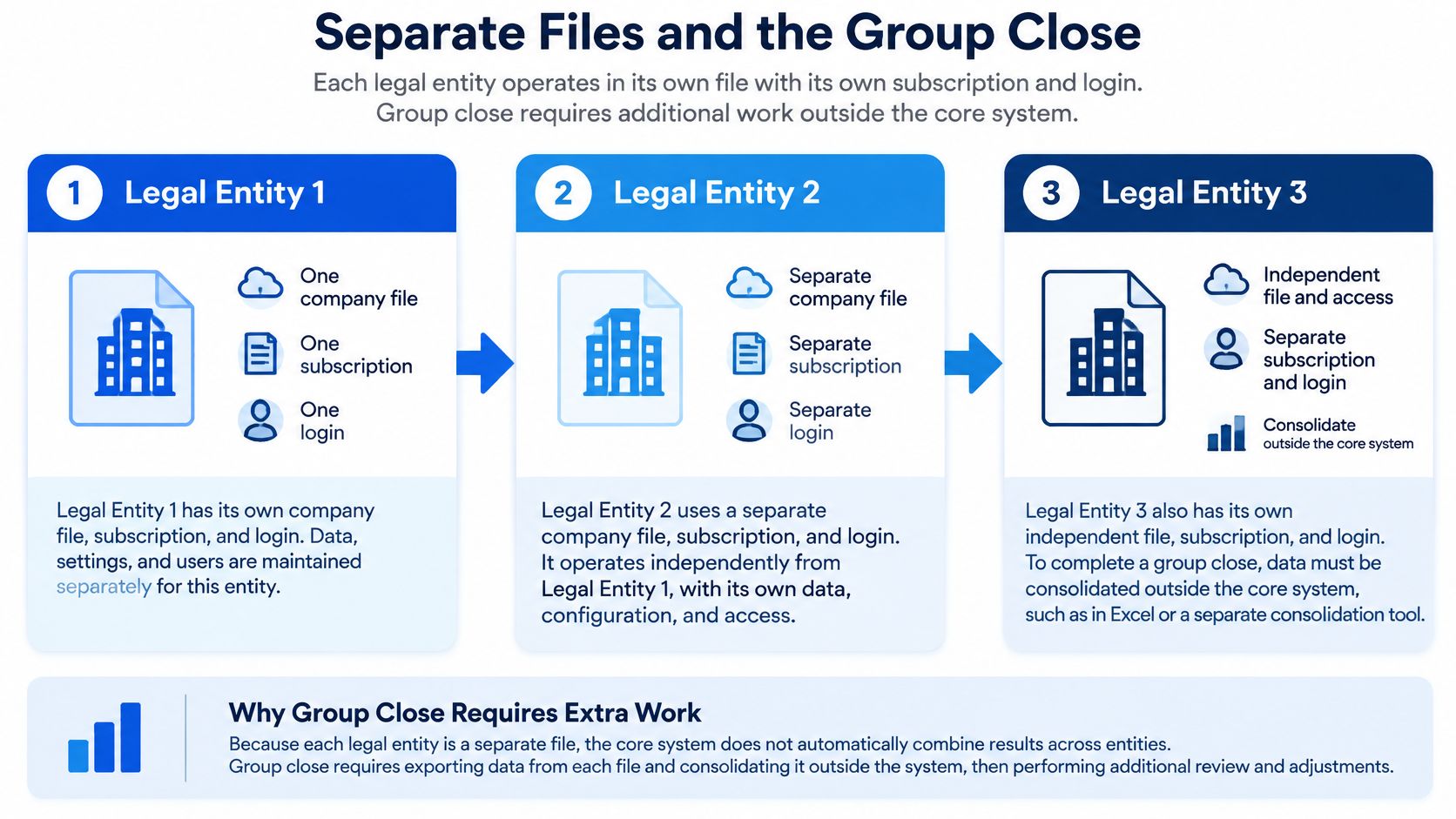
The structural fact comes first. QuickBooks Online's standard multi-entity model uses a separate company file for each legal entity. Intuit's guide to adding another company file confirms that each company needs its own subscription, though you can use one Intuit sign-in to access multiple companies. Independent guidance in Accord Consulting's multi-entity accounting guide describes the separate-file model and the work involved in reporting across companies. Check whether QuickBooks Online Accountant's multi-entity reporting is available for your region and access level before assuming every consolidated profit and loss or balance sheet must be assembled in Excel.
Intercompany balances follow the same pattern. Staff track, reconcile, and eliminate them by hand because the workflow doesn't automatically match or post them across entities. If you need the mechanics, our guide to intercompany accounting journal entries shows the entries your team is likely recreating in that workbook.
Sites Are Not Subsidiaries
Don't blur two different structures. Several clinics or offices inside one legal entity can often remain locations in one file, with one chart and one close. That's a manageable model. A subsidiary, a professional corporation structure, or a related nonprofit with its own books is a different company file, even when the same Controller owns every close. The org chart doesn't decide this. The legal structure does.
One Monthly Cycle, Step by Step
Walk through a typical group month. Your team closes each entity, exports each trial balance, and maps account names that have drifted apart between files. Someone ties intercompany due-to and due-from balances, books eliminations in the workbook, and rebuilds the board pack. Then a late entry lands in one entity, and the workbook owner repeats the tie-out to prove the consolidated total still holds.
A consolidated number that can't be reproduced from a single ledger is harder to explain to a board, a lender, or an auditor.
That reproducibility gap is the main risk, not the spreadsheet itself. Directors ask where a margin movement came from. Auditors ask who changed a mapping and when. A workbook can answer those questions only if your team documents every step, every month, without fail.
Newer multi-entity reporting options can vary by region and by a firm's access, so confirm what your own files can do before you assume a universal consolidation ledger. Then count three things: legal entities, intercompany pairs, and hours spent on the workbook after the last entity closes. Those counts tell you whether the group close is a reporting step or a second, unofficial accounting system.
Classes Locations Funds and Projects
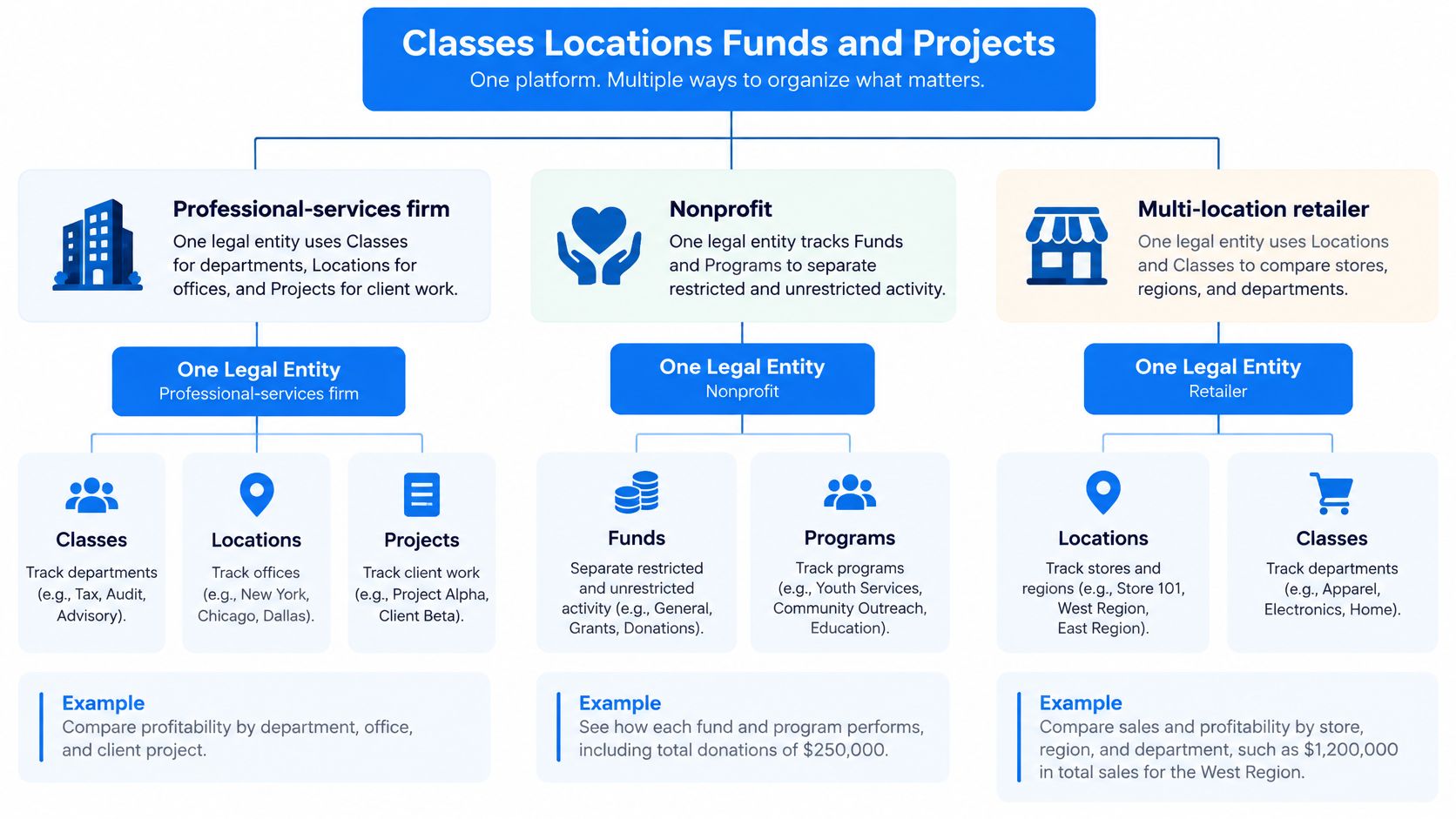
Three organizations show the limits better than a feature list. Each one can start in the same product. Only one stays comfortable there indefinitely.
The Services Firm That Fits
Say a professional-services firm operates as one legal entity. It tags departments with classes, offices with locations, and reviews project profitability from time and expenses coded to each project. Partners can see which practice and which engagement carried the month. That use fits the product when the list stays disciplined and coding rules don't change by person. If your team is setting this up, it helps to track business segments with QuickBooks classes consistently from the first transaction, and to understand how dimensional reporting structures differ when reporting needs outgrow a class list.
The Operator Who Hits the Cap
Now take a growing operator on QuickBooks Online Plus. Per Lucentive's QuickBooks comparison and Intuit's usage limits, Plus has a stated limit of 40 combined classes and locations, while Advanced allows unlimited classes and locations. Departments, programs, branches, and service lines all draw from that combined list, so growth consumes it faster than many expect.
Make the buying point explicit with your team. Adding users doesn't add reporting structure. Extra seats let more people work. They don't create cleaner dimensions, consistent coding rules, or consolidated analysis. Intuit's plan-by-plan usage limits show that user allowances and class and location allowances are separate limits. List your required departments, programs, and sites before you assume your current edition will stretch, and count combinations, not just names.
The Nonprofit Workaround
A nonprofit or faith-based organization often uses classes for programs and grants. Be precise about what that delivers. Intuit describes using classes to track funds, but that setup approximates fund accounting. Classes can report income and expense by program, but a balance sheet by class has limitations. Intuit explains why class-based balance sheets can be incomplete: some balances come from transaction headers rather than class-coded line items. The setup doesn't keep a self-balancing ledger for each fund, enforce a spending restriction when a bill is entered, or automatically produce restriction-based financial statements. Grant packages, encumbrances, and budget-to-actual views often still get assembled by hand.
The approximation is defensible under narrow conditions: few restricted funds, stable coding, and a reviewer who ties class totals back to the books every month. It becomes a governance problem when restricted funds multiply, allocations and releases from restriction need support, and a funder or auditor asks for a fund balance sheet rather than a class column. At that point, your finance team isn't reporting restrictions from the ledger. It's proving them around the ledger, and that proof burden lands on named people at audit time.
Signs the Current Books Are the Bottleneck
Score your own books before you shop. The table below uses measures your team can verify this month, not vendor benchmarks.
| Signal | Still reasonable | Time to reassess |
|---|---|---|
| Legal structure | Several sites inside one legal entity | Each site or subsidiary needs its own company file |
| Close length | Close finishes inside the team's normal window from the product's own reports | Each added entity lengthens the close and the consolidation workbook grows every month |
| Intercompany | Rare activity that is easy to tie out | Monthly eliminations rebuilt in a spreadsheet |
| Funds and grants | Few restrictions and disciplined class coding | Need for a fund balance sheet, encumbrances, or hand-built funder packages |
| Dimensions | Under the Plus cap of 40 combined classes and locations, or already on Advanced | A matrix that forces duplicate charts or an exhausted class list |
| Audit trail | Board totals come from the company reports | Consolidated totals exist only in a workbook that must be remade each month |
The time cost isn't mysterious. Extra close hours go to collecting entity data, reconciling balances, chasing discrepancies, and rebuilding consolidated presentation rather than analyzing performance. The Vena Solutions month-end close benchmarks survey covers how close work expands with organizational complexity, but your own calendar is the evidence that matters. Count business days from period end to a board pack you can defend.
Reading the Signals Honestly
Legal structure is the sharpest signal. When each location is a separate legal entity, you're not managing sites anymore. You're consolidating companies by hand. Intercompany tells the same story in miniature, because eliminations rebuilt monthly are a recurring control your ledger should own.
Funds and dimensions expose quieter strain. Restricted balances that need a real fund balance, or a class and location list sitting at the cap while staff duplicate chart accounts to cope, both mean the reporting structure no longer matches the organization. Project-driven teams feel a version of this too, which is why structured project accounting software becomes relevant when engagement reporting leaves the ledger.
Keep one fair row in mind. Independent sites inside a single legal entity, light restrictions, and a close that finishes from the product's own reports describe a system that still fits. Don't replace it for fashion.
Build a one-page self-score in an hour. Count legal entities, close days to board pack, intercompany pairs, restricted funds, and dimensions that are broken or duplicated. Bring that page to any software conversation. It turns a sales discussion into a fit test.
Decide Whether the Books Still Fit
The score makes the call, not the demo. One legal entity, a class and location list with room to spare, simple restrictions, and a board pack produced by the product's own reports means QuickBooks Online still fits. Stay, tighten coding discipline, and spend the budget elsewhere.
Separate files, workbook consolidation, eliminations rebuilt by hand, or fund statements staff defend in Excel changes the math. Frame the decision as risk and time: close days spent on assembly, numbers nobody can reproduce on demand, and management waiting on a workbook. That cost recurs every month whether you budget for it or not.
Software Alone Is Not the Fix
Buying a platform leaves the hard work with you: the entity map, intercompany rules, chart of accounts, and report design. A partner-led implementation does that design work up front, where it belongs. Compare options on those terms. Sage Intacct is one example of a cloud ERP that holds separate financials per entity while automating the consolidation, including currency conversion, inter-entity transactions, and local tax reporting. Before you sit through any demo, run your numbers through an ERP readiness assessment checklist to test how prepared your entity structure and close are.
Lucentive is a Sage Intacct Value Added Reseller and Premier Implementation Partner that helps CEOs and CFOs at growing organizations, including healthcare and nonprofit organizations, gain clarity and visibility into their financials. We offer QuickBooks to cloud ERP migration, and moving off QuickBooks outlines how that work is scoped. Bring your self-score to a 30-minute working session with our team and test fit against your entities and close before you choose a partner or a system.
Summary
QuickBooks Online is Intuit's subscription accounting product, built on one company file that holds invoices, bills, bank feeds, a chart of accounts, and one company's statements. It fits a single legal entity well. Per-company API limits, the batch cap, and HTTP 429 responses bound integrations, and each added entity means another file with consolidation and eliminations outside the product. Plus caps classes and locations, Advanced lifts the cap, and classes approximate fund reporting without a self-balancing fund ledger.
Judge the fit on the close. Once consolidated totals or restricted balances sit in a workbook the board cannot retrace, the file has stopped fitting, and disciplined records are what turn financial recordkeeping into strategic insights, whatever system holds them.
Frequently Asked Questions
Is QuickBooks Online One Ledger for Every Legal Entity
No. The standard model gives each legal entity a separate company file, with its own subscription and login. Each file produces statements for that company, and there's no built-in unified reporting across companies. Consolidated profit and loss and balance sheet reports are assembled outside the product, typically in Excel, with intercompany eliminations handled by hand each month.
Why Do Group Closes Take Longer
Each added entity adds its own data collection, balance reconciliation, and discrepancy chasing before consolidation can start. Your team then exports trial balances, maps accounts that have drifted, ties intercompany balances, and rebuilds the board pack in a workbook. Those hours crowd out analysis, and a late entry in any entity can force the tie-out to repeat.
Can Classes Produce a Fund Balance Sheet
Classes split income and expense by program or grant, and that's useful reporting. They don't create a self-balancing ledger for each fund, enforce a spending restriction at bill entry, or automatically produce restriction-based financial statements. A funder or auditor asking for a fund balance sheet needs balances your team must prove outside the class report.
Does Adding Users Remove the Class and Location Cap
No. QuickBooks Online Plus allows 40 combined classes and locations, while Advanced allows unlimited classes and locations. Extra seats let more people work in the file, but they don't change the dimensional structure or fix an exhausted class list. Map required departments, programs, and sites first, then judge whether your edition still fits that reporting matrix.
When Is Staying on QuickBooks Online Still Sensible
Staying is sensible when you operate as one legal entity, even across several sites. Your dimensions fit, restrictions are few and coding is disciplined, and board totals still come from the company's own reports. In that position the product remains economical and familiar. Reassess when separate files, manual eliminations, or hand-built statements describe your monthly close.
Bring your one-page self-score, your entity count, and your current close calendar, and we'll test whether your books still fit or whether a cloud ERP migration is warranted. Visit Lucentive to schedule a 30-minute working session with our team and get a clear, no-pressure read on fit for your company.